> For the complete documentation index, see [llms.txt](https://docs.parallels.com/landing/llms.txt). Markdown versions of documentation pages are available by appending `.md` to page URLs; this page is available as [Markdown](https://docs.parallels.com/landing/pd-ag/parallels-desktop-for-mac-enterprise-edition-features/encrypting-a-virtual-machine-using-the-command-line.md).
# Encrypting a Virtual Machine
Starting from Parallels Desktop for Mac 20.3.1, the encryption of provisioned virtual machines and Golden Images is governed by the **Do not allow running VMs without this company's Parallels license** policy (a.k.a. "Lock VM to organization") as described in the [**Policies**](/landing/pd-ag/preparing-virtual-machines-for-deployment-and-securing-them/policies.md) chapter. This way, you can ensure that the virtual machines and Golden Images that may contain sensitive corporate data or access will not launch outside your organization's Parallels Desktop environment.
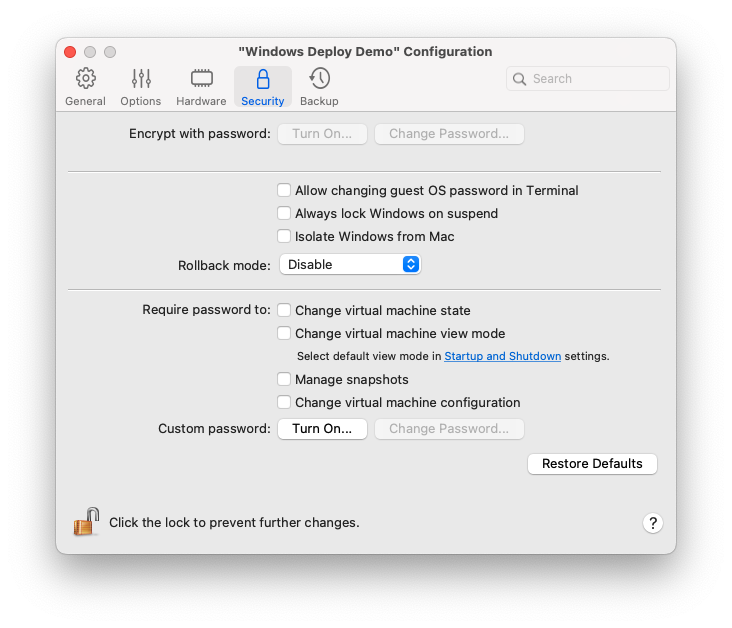
With this change, the respective option in the **Security** tab of the virtual machines' settings has become inactive, even if the aforementioned policy is not applied. This way, your users won't be able to control their corporate virtual machines' security via the graphical interface or the command line utility.
{% hint style="info" %}
**Note**: Users of other editions of Parallels Desktop for Mac will retain the ability to encrypt their virtual machines.
{% endhint %}
### What you need to know before applying this policy
{% hint style="warning" %}
**Attention**: The encryption process for a given virtual machine requires roughly double the amount of disk space that the virtual machine occupies. Plan accordingly.\
\
Check the status using the respective parameter on the Parallels Management Portal.
{% endhint %}
Only stopped or suspended virtual machines undergo the encryption process. Therefore, once you apply this policy and the local Parallels Desktop installation receives the respective command from the server, one of the following things will happen:
* A **new** virtual machine created on your company's Parallels Desktop installation will be encrypted based on your organization's Parallels Desktop Enterprise Edition license regardless of the way it was created: from a Golden Image, from appliances, or via cloning. This encryption method persists through packing, conversion to a template, or other operations.
* A **stopped**/**suspended** virtual machine will be encrypted right away.
* A **running** virtual machine will be encrypted as soon as it is stopped or suspended.
* A **packed** virtual machine will be unpacked, encrypted, and packed again.
* An **archived** virtual machine will be unarchived, encrypted, and packed due to the archiving functionality being deprecated.
* For a virtual machine **encrypted** on the user side, Parallels Desktop will wait for the user to perform an operation that requires the encryption password and then change the encryption from the user-side one to the one tied to your organization's Parallels Desktop Enterprise Edition license.
As a result of tying your provisioned virtual machines' encryption to the license, users won't be able to launch such virtual machines on Parallels Desktop installations activated with any license other than your company's.
---
# Agent Instructions
This documentation is published with GitBook. GitBook is the documentation platform designed so that both humans and AI agents can read, navigate, and reason over technical content effectively. Learn more at gitbook.com.
## Querying This Documentation
If you need additional information that is not directly available in this page, you can query the documentation dynamically by asking a question.
Perform an HTTP GET request on the current page URL with the `ask` query parameter, and the optional `goal` query parameter:
```
GET https://docs.parallels.com/landing/pd-ag/parallels-desktop-for-mac-enterprise-edition-features/encrypting-a-virtual-machine-using-the-command-line.md?ask=&goal=
```
`ask` is the immediate question: it should be specific, self-contained, and written in natural language.
`goal` is optional and describes the broader end goal you are ultimately trying to accomplish on behalf of the user. GitBook uses it to tailor the answer towards what is most useful for that goal.
The response will contain a direct answer to the question and relevant excerpts and sources from the documentation.
Use this mechanism when the answer is not explicitly present in the current page, you need clarification or additional context, or you want to retrieve related documentation sections.