> For the complete documentation index, see [llms.txt](https://docs.parallels.com/landing/llms.txt). Markdown versions of documentation pages are available by appending `.md` to page URLs; this page is available as [Markdown](https://docs.parallels.com/landing/pd-ag/provisioning-and-activation-of-parallels-desktop/alternative-deployment-methods/alternative-mass-deployment-via-deployment-package/preparing-the-autodeploy-package/downloading-the-autodeploy-package.md).
# Downloading the Autodeploy Package
If you haven't already, use the link below to download the Parallels Desktop Autodeploy Package directly to a Mac computer.
[Download the deployment package here](https://link.parallels.com/pd/deployment-package).
{% hint style="danger" %}
**Attention!** Once you have downloaded the `ZIP` file, it is **essential** that you remove any quarantine attributes from it, as they may affect all further steps. To do that, execute the following command in the macOS Terminal:
`xattr -dr com.apple.quarantine /Users/{username}/Downloads/pd-autodeploy.zip`
Make sure the file path matches that of your downloaded package.\
\
If the package has already been unarchived automatically, use the following command:\
\
`xattr -dr com.apple.quarantine /Users/{username}/Downloads/Parallels\ Desktop\ mass\ deployment\ paclage`
Make sure the file path matches that of your downloaded package.
To verify that the quarantine attribute has been removed, execute the following command (utilizing a package or folder path):
`xattr -r /Users/{username}/Downloads/pd-autodeploy.zip | grep com.apple.quarantine`
{% endhint %}
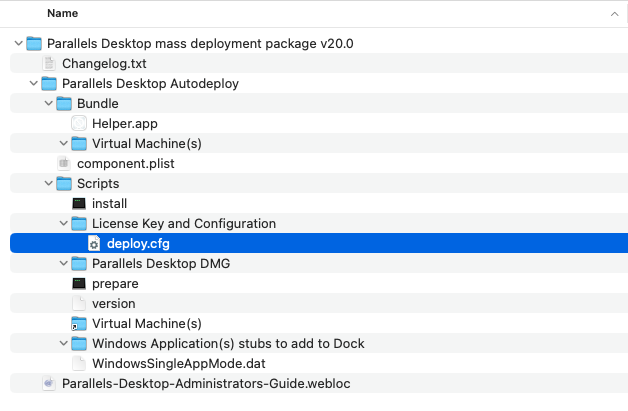
The autodeploy package archive contains a folder named "Parallels Desktop mass deployment package `vxxx`", where "`vxxx`" is the autodeploy package version number.
The folder contains the following files:
* **Changelog.txt** — contains a record of changes that were made to the autodeploy package over time.
* **Deploy.cfg** — contains all the parameters that you'll need to check and set, as described [here](/landing/pd-ag/provisioning-and-activation-of-parallels-desktop/alternative-deployment-methods/alternative-mass-deployment-via-deployment-package/preparing-the-autodeploy-package/configuring-deployment-options.md).
* **Prepare** — contains the build script that creates a [flat package](/landing/pd-ag/provisioning-and-activation-of-parallels-desktop/alternative-deployment-methods/alternative-mass-deployment-via-deployment-package/preparing-the-autodeploy-package/mandatory-creating-a-flat-package.md) ready for deployment.
Read on to learn how to add the necessary components to the autodeploy package.
---
# Agent Instructions
This documentation is published with GitBook. GitBook is the documentation platform designed so that both humans and AI agents can read, navigate, and reason over technical content effectively. Learn more at gitbook.com.
## Querying This Documentation
If you need additional information that is not directly available in this page, you can query the documentation dynamically by asking a question.
Perform an HTTP GET request on the current page URL with the `ask` query parameter, and the optional `goal` query parameter:
```
GET https://docs.parallels.com/landing/pd-ag/provisioning-and-activation-of-parallels-desktop/alternative-deployment-methods/alternative-mass-deployment-via-deployment-package/preparing-the-autodeploy-package/downloading-the-autodeploy-package.md?ask=&goal=
```
`ask` is the immediate question: it should be specific, self-contained, and written in natural language.
`goal` is optional and describes the broader end goal you are ultimately trying to accomplish on behalf of the user. GitBook uses it to tailor the answer towards what is most useful for that goal.
The response will contain a direct answer to the question and relevant excerpts and sources from the documentation.
Use this mechanism when the answer is not explicitly present in the current page, you need clarification or additional context, or you want to retrieve related documentation sections.