# Host-Only Network Settings
{% hint style="info" %}
**Note:** Host-only network settings are available in Parallels Desktop for Mac Pro and Business/Enterprise Editions only.\
\
If you have an Apple silicon Mac and want to run a macOS virtual machine in host-only mode, you need to update your Mac's OS to macOS Sequoia 15 or newer and Parallels Desktop to version 20.4.0 or newer.
{% endhint %}
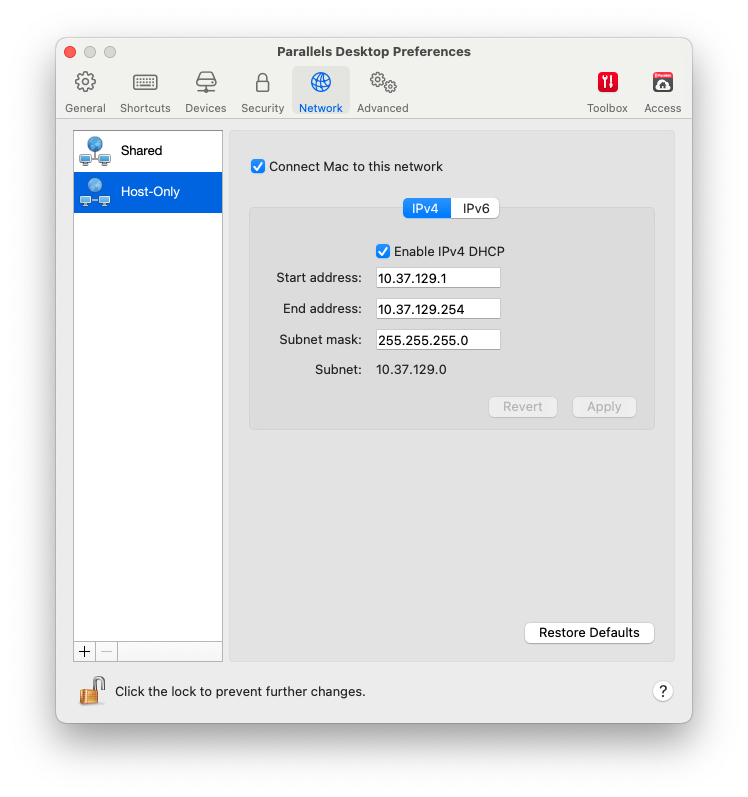
To change the host-only networking settings, select the **Network** tab of Parallels Desktop Preferences and click **Host-Only**. You will see the following window:
In this window, you can make the necessary changes to the settings of the Parallels DHCP servers for IPv4 and IPv6. These servers, enabled by default, automatically assign IP addresses to the virtual machines operating in the host-only networking mode. To disable any of these servers, clear the corresponding option.
To restore the default settings, click **Restore Defaults**.
For more information on configuring the host-only networking settings, refer to [**Using Host-Only Network Settings**](https://docs.parallels.com/landing/pdfm-ug/parallels-desktop-for-mac-26-users-guide/use-windows-on-your-mac/connecting-to-the-internet-or-a-network/using-host-only-network-settings).
---
# Agent Instructions: Querying This Documentation
If you need additional information that is not directly available in this page, you can query the documentation dynamically by asking a question.
Perform an HTTP GET request on the current page URL with the `ask` query parameter:
```
GET https://docs.parallels.com/landing/pdfm-ug/parallels-desktop-for-mac-26-users-guide/advanced-topics/host-only-network-settings.md?ask=
```
The question should be specific, self-contained, and written in natural language.
The response will contain a direct answer to the question and relevant excerpts and sources from the documentation.
Use this mechanism when the answer is not explicitly present in the current page, you need clarification or additional context, or you want to retrieve related documentation sections.