> For the complete documentation index, see [llms.txt](https://docs.parallels.com/landing/llms.txt). Markdown versions of documentation pages are available by appending `.md` to page URLs; this page is available as [Markdown](https://docs.parallels.com/landing/pdfm-ug/v20-ja-jp/parallels-desktop-for-mac-20-yzzugaido/na/mashinno/mashinno-3.md).
# 仮想マシンの複製
仮想マシン全体のコピーが必要な場合、この仮想マシンを複製することができます。複製とは、元の仮想マシンとまったく同一である別の仮想マシンです。複製を作成するには、以下の操作を実行します。
1. Parallels Desktop を起動します。
2. **コントロールセンター**で、複製したい仮想マシンを選択し(シャットダウンされている必要があります)、**\[ファイル]** > **\[複製]** を選択します。
3. 複製を格納する場所を選択します。
Parallels Desktop では、デフォルトで複製が \[`~/Parallels`] フォルダーに保存されます。
4. **\[保存]** をクリックして仮想マシンの複製を開始します。
### **仮想マシンのリンククローンを作成する**
{% hint style="info" %}
**注:** この機能は Parallels Desktop for Mac Pro Edition でのみ利用できます。
{% endhint %}
リンククローンとは、仮想ハードディスクを親の仮想マシンと共有する仮想マシンのことです。このテクノロジーによって、親の仮想マシンのハードディスクにインストールされたソフトウェアを複数の仮想マシンで使用することが可能になります。これにより、ユーザーは Mac のハードディスクのスペースを節約することができます。リンククローンを作成するには、以下の操作を実行します。
1. Parallels Desktop を起動します。
2. **コントロールセンター**で、複製したい仮想マシンを選択し(シャットダウンされている必要があります)、**\[ファイル]** > **\[新規のリンクされた複製]** を選択します。
3. 複製を格納する場所を選択します。
デフォルトでは、Parallels Desktop では元の仮想マシンがあるフォルダーにリンククローンが保存されます。
4. **\[保存]** をクリックして仮想マシンの複製を開始します。
### **仮想マシンクローンのリンクを解除する**
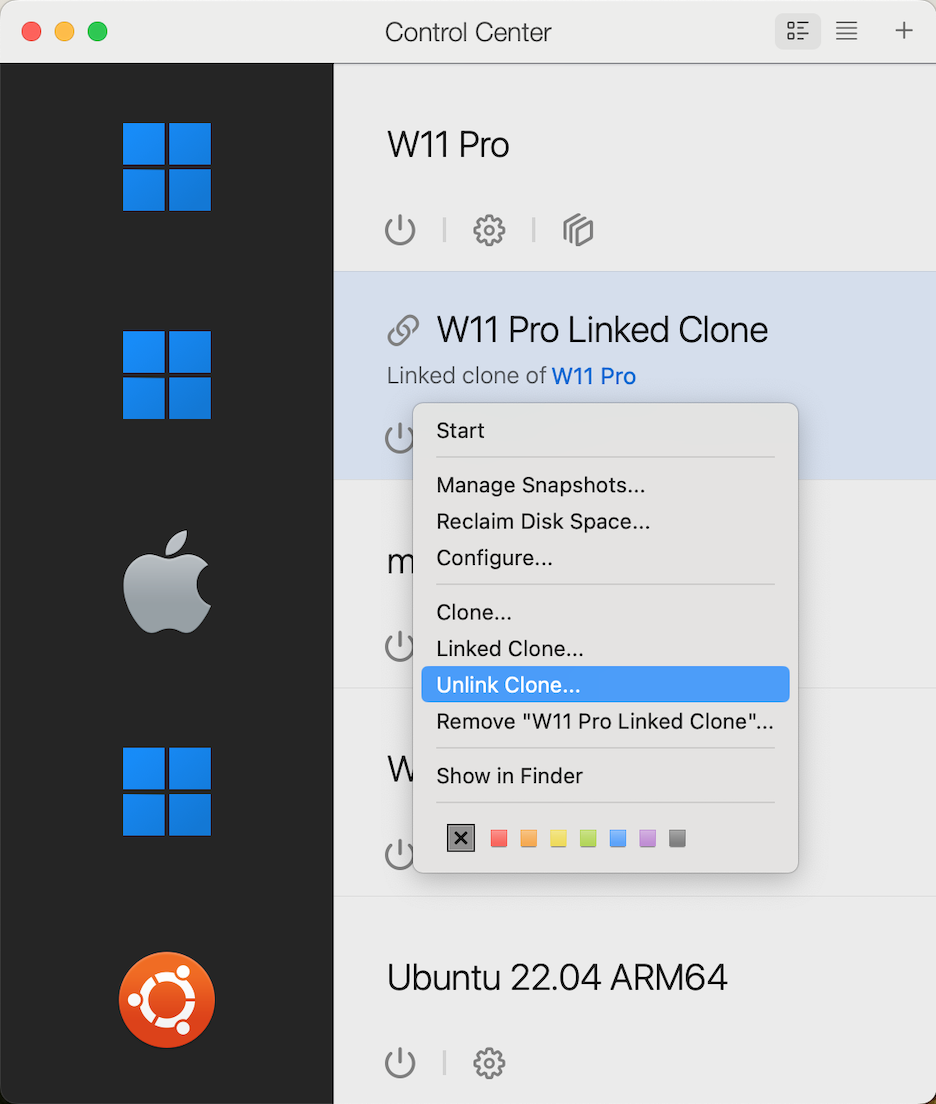
リンクされたクローンを他の場所に移したい場合は、まずクローンをスタンドアロンマシンに変換する必要があります。これを実行するには、Parallels Desktop コントロールセンターでリンクされているクローンを右クリックし、**\[クローンのリンクを解除] オプションを選択します。**
これにより、リンクされたクローンは、リンクされていない元のマシンのスタンドアロンクローンに変換されます。
{% hint style="warning" %}
**注**: リンクされたクローンとは異なり、この新しいリンクされていないクローンは、元の仮想マシンのサイズとほぼ同等のディスク領域を占有します。この作業を行う前に、十分な空き領域があることを確認してください。
{% endhint %}
---
# Agent Instructions
This documentation is published with GitBook. GitBook is the documentation platform designed so that both humans and AI agents can read, navigate, and reason over technical content effectively. Learn more at gitbook.com.
## Querying This Documentation
If you need additional information that is not directly available in this page, you can query the documentation dynamically by asking a question.
Perform an HTTP GET request on the current page URL with the `ask` query parameter, and the optional `goal` query parameter:
```
GET https://docs.parallels.com/landing/pdfm-ug/v20-ja-jp/parallels-desktop-for-mac-20-yzzugaido/na/mashinno/mashinno-3.md?ask=&goal=
```
`ask` is the immediate question: it should be specific, self-contained, and written in natural language.
`goal` is optional and describes the broader end goal you are ultimately trying to accomplish on behalf of the user. GitBook uses it to tailor the answer towards what is most useful for that goal.
The response will contain a direct answer to the question and relevant excerpts and sources from the documentation.
Use this mechanism when the answer is not explicitly present in the current page, you need clarification or additional context, or you want to retrieve related documentation sections.