> For the complete documentation index, see [llms.txt](https://docs.parallels.com/landing/llms.txt). Markdown versions of documentation pages are available by appending `.md` to page URLs; this page is available as [Markdown](https://docs.parallels.com/landing/pdfm-ug/v20-ja-jp/parallels-desktop-for-mac-20-yzzugaido/parallels-desktop-tomashin/mashin/hdowea/cpu-tomemorino.md).

# CPU とメモリの設定

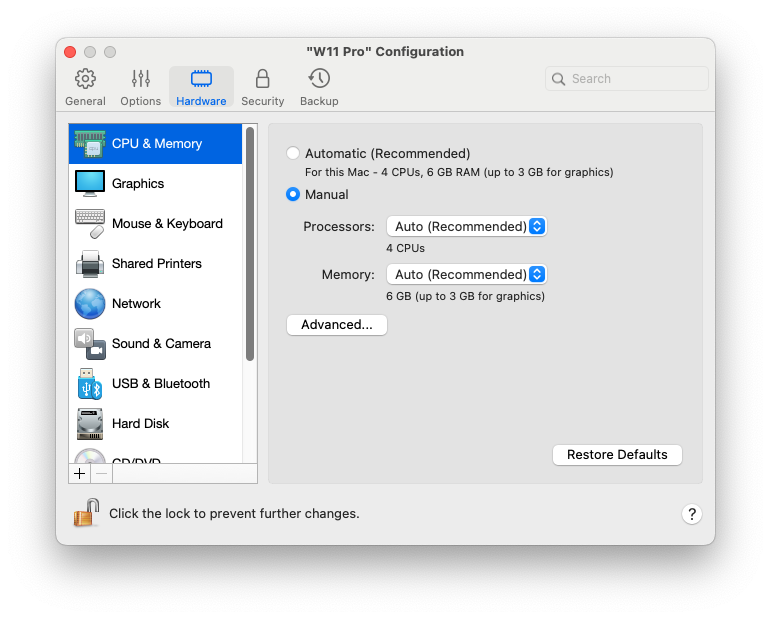
**\[CPU およびメモリ]** ペインで、CPU とメモリ関連の設定を表示および構成できます。

この設定を開くには、**\[処理]** > **\[設定]** > **\[ハードウェア]** の順に選択して、**\[CPU およびメモリ]** をクリックします。

<figure><img src="https://content.gitbook.com/content/yW32bt55qpQ60Sjv48dc/blobs/3N0hADtsn3hkistxuEdK/Screenshot%202024-01-19%20at%2017.46.41.png" alt="" width="563"><figcaption></figcaption></figure>

<table><thead><tr><th width="287">オプション</th><th>説明</th></tr></thead><tbody><tr><td><strong>CPU とメモリの割り当て</strong></td><td><p>Windows 10 以降を使用している場合、Parallels Desktop が仮想マシンに必要な CPU のコア数とメモリ容量を自動的に割り当てるため、最適なパフォーマンスと優れた使用感を得ることができます。デフォルト設定の使用をお勧めします。<br></p><p>ただし、仮想マシンのパフォーマンスに不足がある場合は、仮想マシンで利用できる CPU やメモリ容量を手動で指定できます。<strong>[手動]</strong> を選択し、対応するフィールドから任意の値を選択します。<br></p><p>Parallels Desktop for Mac Standard Edition で作成および実行される仮想マシンのリソースには、4 つの vCPU コアおよび 8GB の vRAM の制限があります。Pro Edition および Busines Edition には以下の制限があります。</p><ul><li>Intel Mac の場合は最大 32 個の vCPU コア、Apple Silicon Mac の場合は最大 18 個の vCPU コア（テスト済み最大数）。</li><li><p>Intel Mac の場合は最大 128GB の RAM、Apple Silicon Mac の場合、</p><ul><li>ホストが macOS 12 Monterey またはそれ以前を実行し、39 ビット中間アドレス空間を実装していない場合、最大 63GB（M1 および M2 チップのベースバージョン）。</li><li>その他の場合は最大 128GB。</li></ul></li></ul><p>ただし、必ずしも<em>大きな値</em>を指定すればパフォーマンスが向上するわけではありません。まず、デフォルト設定で仮想マシンを動作させてみてください。スムーズに動作しない場合は、メモリや CPU のコア数を増加させてみてください。仮想マシンのパフォーマンスが向上したでしょうか。そうでない場合は、CPU やメモリの割り当てをさらに変更してみてください。仮想マシンのパフォーマンスは、Mac のハードウェア、Mac 上で実行されているアプリ、仮想マシン内で実行されているアプリなどに依存するため、特定のベストプラクティスに言及することは簡単ではありません。<br></p><p>Windows 8.1 以前、Linux または macOS のオペレーティングシステムを搭載した仮想マシンの場合、<strong>[プロセッサー]</strong> と <strong>[メモリ]</strong> メニューで、仮想マシンが利用できる CPU コアとメモリ容量を選択できます。</p></td></tr><tr><td><p><strong>ハイパーバイザー</strong><br></p><p>このメニューは、Intel プロセッサーを搭載した Mac でのみ利用可能です。Apple Silicon Mac で作成された仮想マシンは、常に Apple のハイパーバイザーを使用します。</p></td><td>このメニューで、Parallels または Apple からハイパーバイザーを使用するかどうかを選択できます。Parallels ハイパーバイザーの使用をお勧めします。</td></tr><tr><td><strong>アダプティブハイパーバイザー</strong></td><td>使用しているアプリケーションに応じて、仮想マシンまたは macOS のパフォーマンスを自動的に最適化するように Parallels Desktop を設定する場合に、このオプションを選択します。仮想マシンのアプリケーションを使用しているときは仮想マシンに多くのリソースが与えられ、macOS のアプリケーションを使用しているときは macOS により多くのリソースが与えられます。</td></tr><tr><td><p><strong>多段仮想化を有効にする</strong></p><p>このメニューは、Intel プロセッサー搭載の Mac にインストールされた Parallels Desktop for Mac Pro および Business Edition で、仮想マシンが Parallels ハイパーバイザーを使用するように構成されている場合にのみ利用できます。</p></td><td><p>このオプションは、ネストされた仮想化のサポートを有効にする場合に選択します。Parallels Desktop では、以下を実行できます。</p><ul><li>Windows 8 以降または Windows Server 2012 以降仮想マシン内の Hyper-V 仮想マシン。</li><li>macOS 仮想マシン内の Parallels Desktop。</li><li>VMware ESXi 仮想マシン、</li><li>Xen および KVM をサポートする Linux バージョンでの Xen およびカーネルベースの仮想マシン。</li></ul><p><strong>注:</strong> 仮想マシン内で仮想マシンを実行すると、macOS と仮想マシンのパフォーマンスが劇的に低下する可能性があります。<br></p><p>Parallels 仮想マシンを使用してアプリケーションを構築、デバッグ、テストする場合は、多段仮想化を有効にして、次の環境をインストールして作業します。</p><ul><li>Visual Studio 用 Android エミュレーター、</li><li>Visual Studio 用 iPhone エミュレーター、</li><li>Xamarin.Android、</li><li>Android Studio、</li><li>Embarcadero RAD Studio、</li><li>Docker for Windows、</li><li>Microsoft Visual Studio + TwinCat 3（TwinCat 3 のサポートはテスト中で、バグがある可能性があります）。</li></ul></td></tr></tbody></table>


---

# Agent Instructions
This documentation is published with GitBook. GitBook is the documentation platform designed so that both humans and AI agents can read, navigate, and reason over technical content effectively. Learn more at gitbook.com.

## Querying This Documentation
If you need additional information that is not directly available in this page, you can query the documentation dynamically by asking a question.

Perform an HTTP GET request on the current page URL with the `ask` query parameter, and the optional `goal` query parameter:

```
GET https://docs.parallels.com/landing/pdfm-ug/v20-ja-jp/parallels-desktop-for-mac-20-yzzugaido/parallels-desktop-tomashin/mashin/hdowea/cpu-tomemorino.md?ask=<question>&goal=<endgoal>
```

`ask` is the immediate question: it should be specific, self-contained, and written in natural language.
`goal` is optional and describes the broader end goal you are ultimately trying to accomplish on behalf of the user. GitBook uses it to tailor the answer towards what is most useful for that goal.

The response will contain a direct answer to the question and relevant excerpts and sources from the documentation.

Use this mechanism when the answer is not explicitly present in the current page, you need clarification or additional context, or you want to retrieve related documentation sections.
