> For the complete documentation index, see [llms.txt](https://docs.parallels.com/landing/llms.txt). Markdown versions of documentation pages are available by appending `.md` to page URLs; this page is available as [Markdown](https://docs.parallels.com/landing/pdfm-ug/v20-ja-jp/parallels-desktop-for-mac-20-yzzugaido/parallels-desktop-tomashin/mashin/hdowea/hdodisuku.md).

# ハードディスク設定

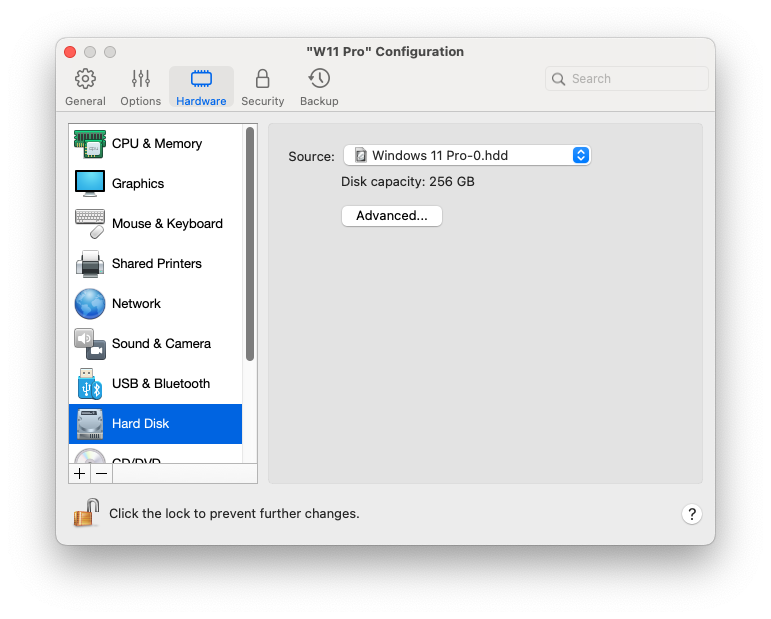
**\[ハードディスク]** ペインで、仮想マシンのハードディスク関連の設定を表示および構成できます。

この設定を開くには、**\[処理]** > **\[構成]** > **\[ハードウェア]** を選択し、**\[ハードディスク]** をクリックします。

<figure><img src="https://content.gitbook.com/content/yW32bt55qpQ60Sjv48dc/blobs/n1HPCz3JSrGCRf4yoE9h/Screenshot%202024-01-19%20at%2018.31.59.png" alt="" width="563"><figcaption></figcaption></figure>

<table><thead><tr><th width="199">オプション</th><th>説明</th></tr></thead><tbody><tr><td><strong>ソース</strong></td><td><p>このフィールドを使用して、仮想マシンのハードディスクをエミュレートする仮想ハードディスクファイル（<code>.hdd</code>） を指定します。</p><ul><li>Boot Camp パーティションを使用するには、リストから選択します。</li></ul><p><strong>注:</strong> Boot Camp を選択できるのは、Intel Mac の場合のみです。Boot Camp は Apple Silicon Mac では利用できません。</p><ul><li>仮想ハードディスクファイルを使用するには、一覧から仮想ハードディスクファイルを選択するか、<strong>[イメージファイルの選択]</strong> をクリックしてイメージファイル（<code>.hdd</code>）へのパスを指定します。</li></ul></td></tr><tr><td><strong>プロパティ</strong></td><td>このボタンをクリックして、ハードディスクのサイズを編集します。</td></tr><tr><td><strong>場所</strong></td><td>このフィールドを使用して、ハードディスクを接続するインターフェイスの種類を指定します。このオプションは上級ユーザー向けです。</td></tr><tr><td><strong>TRIM を有効にする</strong></td><td>多くの場合、仮想マシンが使用するハードディスク領域は、ファイルやその他のデータを追加すると拡大しますが、データを削除しても減少しません。Parallels Desktop で、ディスク領域を自動的に削減するように設定するには、<strong>[TRIM を有効にする]</strong> を選択します。このオプションは、HDD（SSD ではなく）ディスクのパフォーマンスに影響を与える可能性があります。</td></tr></tbody></table>


---

# Agent Instructions
This documentation is published with GitBook. GitBook is the documentation platform designed so that both humans and AI agents can read, navigate, and reason over technical content effectively. Learn more at gitbook.com.

## Querying This Documentation
If you need additional information that is not directly available in this page, you can query the documentation dynamically by asking a question.

Perform an HTTP GET request on the current page URL with the `ask` query parameter, and the optional `goal` query parameter:

```
GET https://docs.parallels.com/landing/pdfm-ug/v20-ja-jp/parallels-desktop-for-mac-20-yzzugaido/parallels-desktop-tomashin/mashin/hdowea/hdodisuku.md?ask=<question>&goal=<endgoal>
```

`ask` is the immediate question: it should be specific, self-contained, and written in natural language.
`goal` is optional and describes the broader end goal you are ultimately trying to accomplish on behalf of the user. GitBook uses it to tailor the answer towards what is most useful for that goal.

The response will contain a direct answer to the question and relevant excerpts and sources from the documentation.

Use this mechanism when the answer is not explicitly present in the current page, you need clarification or additional context, or you want to retrieve related documentation sections.
