> For the complete documentation index, see [llms.txt](https://docs.parallels.com/landing/llms.txt). Markdown versions of documentation pages are available by appending `.md` to page URLs; this page is available as [Markdown](https://docs.parallels.com/landing/pdfm-ug/v20-ja-jp/parallels-desktop-for-mac-20-yzzugaido/parallels-desktop-tomashin/mashin/hdowea/nettowku.md).

# ネットワーク設定

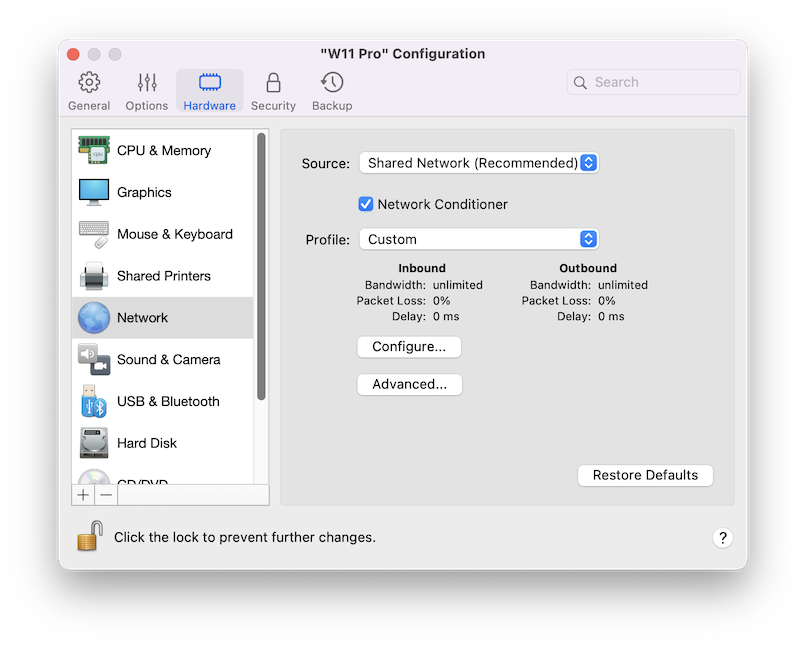
**\[ネットワーク]** ペインで、仮想マシンのネットワークアダプター関連の設定を表示および構成できます。

この設定を開くには、**\[処理]** > **\[構成]** > **\[ハードウェア]** を選択し、**\[ネットワーク]** をクリックします。

<figure><img src="https://content.gitbook.com/content/yW32bt55qpQ60Sjv48dc/blobs/MSDCabxkxjIzdc3ibLoP/image.png" alt="" width="563"><figcaption></figcaption></figure>

<table><thead><tr><th width="250">オプション</th><th>説明</th></tr></thead><tbody><tr><td><strong>ソース</strong></td><td><p>このメニューを使用して、仮想マシンのネットワークアダプターに対して以下のいずれかの種類のネットワークを選択できます。</p><ul><li><strong>共有ネットワーク</strong>: このオプションは、仮想マシンで NAT（Network Address Translation）機能を有効にする場合に選択します。この場合、仮想マシンは、Mac で現在使用されているネットワーク接続の種類に関係なく、ネットワークを共有します。</li><li><strong>ブリッジネットワーク</strong>。仮想マシンが、Mac にインストールされているいずれかのネットワークアダプターを通じてローカルネットワークやインターネットにアクセスできるようにする場合には、このオプションを選択します。この場合、仮想マシンはネットワーク上のスタンドアロンコンピューターとして扱われ、実コンピューターと同様に構成されます。仮想マシンアダプタのブリッジ先となる物理アダプタを、<strong>[ブリッジネットワーク]</strong> オプションの下に表示される一覧で選択できます。</li><li><strong>[ホストオンリネットワーク]</strong>。仮想マシンをご利用の Mac や Mac 上の仮想マシンに接続できるようにすると同時に、Mac の外部で非表示とする場合に、このオプションを選択します。このオプションを選択した場合、仮想マシンをインターネットに接続することはできません。<br><br><strong>注</strong>： Apple 製のシリコン Mac を使用しており、macOS 仮想マシンを「ホストのみ」モードで実行する場合は、Mac の OS を macOS Sequoia 15 以降にアップデートし、Parallels Desktop をバージョン 20.4.0 以降にアップデートする必要があります。</li><li><strong>切断</strong>: 仮想マシンをネットワークから完全に切り離します。</li></ul></td></tr><tr><td><p><strong>ネットワーク調整</strong></p><p>（macOS 仮想マシンでは利用できません）</p></td><td>このオプションは、<strong>[プロファイル]</strong> ドロップダウンメニューに列挙された特定タイプのネットワーク接続に特徴的な動作を再現するために使用します。<strong>カスタム</strong>プロファイルを設定し、<strong>[構成]</strong> ボタンをクリックして、必要に応じて速度、遅延、パケットロスを調整できます。</td></tr><tr><td><strong>高度 -> MAC</strong></td><td><strong>[MAC]</strong> フィールドで、仮想マシンに現在割り当てられている MAC アドレスを変更できます。MAC アドレスは、仮想マシンの作成中に自動的に生成されますが、デフォルトの MAC アドレスは、<strong>[MAC]</strong> フィールドに別の値を入力するか、<strong>[生成]</strong> ボタンをクリックすることで変更できます。新しい MAC アドレスを入力した場合、ネットワーク内で一意であることを確認してください。このオプションは上級ユーザー向けです。</td></tr><tr><td><strong>詳細 -> 種類</strong><br>（Intel Mac でのみ利用可能）</td><td><p>ネットワークインターフェイスカードの種類を変更することができます。Parallels サポートチームからの指示がない限り、デフォルト設定の変更はお勧めしません。このオプションは上級ユーザー向けです。<br></p><p>Apple Silicon Mac では、仮想マシンが Virtio ネットワークアダプターを使用するように設定されています。</p></td></tr><tr><td><strong>高度 -> ネットワークの環境設定を開く</strong></td><td>このボタンをクリックすると、Parallels Desktop 環境設定パネルの [ネットワーク] タブが表示されます。詳細については、<a href="/landing/pdfm-ug/v20-ja-jp/parallels-desktop-for-mac-20-yzzugaido/mac-de-windows-wosuru/intnettomatahanettowkuheno.md">こちらのページ</a>を参照してください。</td></tr></tbody></table>


---

# Agent Instructions
This documentation is published with GitBook. GitBook is the documentation platform designed so that both humans and AI agents can read, navigate, and reason over technical content effectively. Learn more at gitbook.com.

## Querying This Documentation
If you need additional information that is not directly available in this page, you can query the documentation dynamically by asking a question.

Perform an HTTP GET request on the current page URL with the `ask` query parameter, and the optional `goal` query parameter:

```
GET https://docs.parallels.com/landing/pdfm-ug/v20-ja-jp/parallels-desktop-for-mac-20-yzzugaido/parallels-desktop-tomashin/mashin/hdowea/nettowku.md?ask=<question>&goal=<endgoal>
```

`ask` is the immediate question: it should be specific, self-contained, and written in natural language.
`goal` is optional and describes the broader end goal you are ultimately trying to accomplish on behalf of the user. GitBook uses it to tailor the answer towards what is most useful for that goal.

The response will contain a direct answer to the question and relevant excerpts and sources from the documentation.

Use this mechanism when the answer is not explicitly present in the current page, you need clarification or additional context, or you want to retrieve related documentation sections.
