> For the complete documentation index, see [llms.txt](https://docs.parallels.com/landing/llms.txt). Markdown versions of documentation pages are available by appending `.md` to page URLs; this page is available as [Markdown](https://docs.parallels.com/landing/pdfm-ug/v20-ja-jp/parallels-desktop-for-mac-20-yzzugaido/parallels-desktop-tomashin/mashin/hdowea/usb-to-bluetooth-no.md).

# USB と Bluetooth の設定

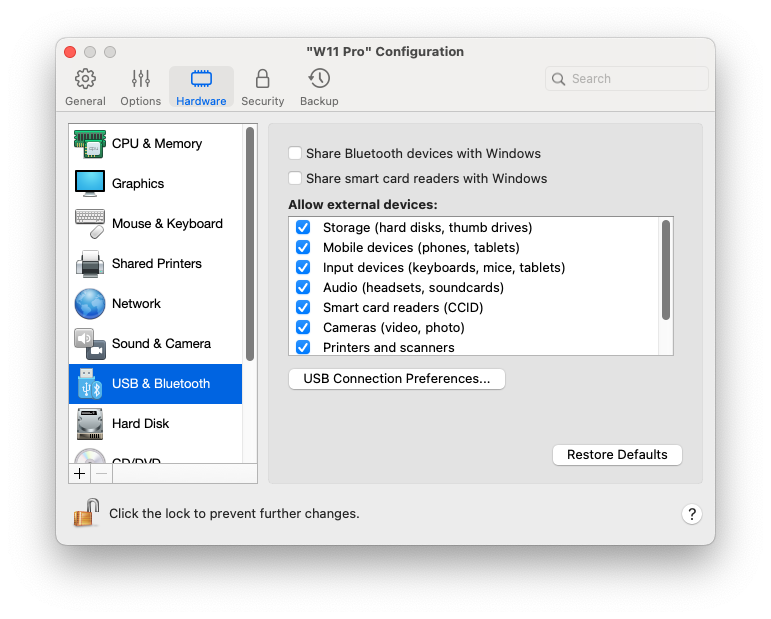
**\[USB と Bluetooth]** ペインで、USB および Bluetooth 関連の設定を表示および構成できます。

これらの設定を開くには、**\[処理]** > **\[構成]** > **\[ハードウェア]** を選択し、**\[USB と Bluetooth]** をクリックします。

<figure><img src="https://content.gitbook.com/content/yW32bt55qpQ60Sjv48dc/blobs/cF0D9G26QSZyD6ArcNWI/Screenshot%202024-01-19%20at%2018.30.17.png" alt="" width="563"><figcaption></figcaption></figure>

<table><thead><tr><th width="312">オプション</th><th>説明</th></tr></thead><tbody><tr><td><strong>Bluetooth デバイスを Windows と共有する</strong></td><td>このオプションを使用して、Bluetooth デバイスの共有を有効または無効にします。</td></tr><tr><td><strong>[Windows とスマートカードリーダーを共有する]</strong></td><td><p>このオプションを選択すると、Windows で Mac のスマートカードリーダーを使用できます。<br></p><p>macOS で正しく機能する（つまり、必要なドライバーがインストールされている）スマートカードリーダーのみ使用できることに注意してください。<br></p><p>スマートカードリーダーが macOS では機能するのに、何らかの理由で Windows に表示されない場合、<a href="/landing/pdfm-ug/v20-ja-jp/parallels-desktop-for-mac-20-yzzugaido/mac-de-windows-wosuru/debaisuno.md">ここで説明されている</a>ように、<strong>[デバイス]</strong> > <strong>[USB と Bluetooth]</strong> メニューを使用して接続してみてください。</p></td></tr><tr><td><strong>外部デバイスを許可</strong>（Parallels Desktop for Mac Business Edition でのみ利用できます）</td><td>この一覧を使用して、USB 経由で仮想マシンに接続できるデバイスを指定します。</td></tr><tr><td><strong>USB 3.1 を有効化</strong></td><td><p>このオプションは、Intel プロセッサーを搭載した Mac コンピューターでのみ利用可能です。USB 3.1 のサポートを有効にするもので、デフォルトで選択されています。<a href="/landing/pdfm-ug/v20-ja-jp/parallels-desktop-for-mac-20-yzzugaido/mac-de-windows-wosuru/debaisuno.md">仮想マシンに USB デバイスを接続しても</a>検出されない、または動作しない場合は、このオプションの選択を解除し、仮想マシンを再起動してから、もう一度デバイスを接続してみてください。<br></p><p>Apple Silicon Mac では、USB 3.1 サポートは常に有効になっています。そうでない場合、仮想マシンでキーボードとマウスが使用できなくなります。</p></td></tr></tbody></table>


---

# Agent Instructions
This documentation is published with GitBook. GitBook is the documentation platform designed so that both humans and AI agents can read, navigate, and reason over technical content effectively. Learn more at gitbook.com.

## Querying This Documentation
If you need additional information that is not directly available in this page, you can query the documentation dynamically by asking a question.

Perform an HTTP GET request on the current page URL with the `ask` query parameter, and the optional `goal` query parameter:

```
GET https://docs.parallels.com/landing/pdfm-ug/v20-ja-jp/parallels-desktop-for-mac-20-yzzugaido/parallels-desktop-tomashin/mashin/hdowea/usb-to-bluetooth-no.md?ask=<question>&goal=<endgoal>
```

`ask` is the immediate question: it should be specific, self-contained, and written in natural language.
`goal` is optional and describes the broader end goal you are ultimately trying to accomplish on behalf of the user. GitBook uses it to tailor the answer towards what is most useful for that goal.

The response will contain a direct answer to the question and relevant excerpts and sources from the documentation.

Use this mechanism when the answer is not explicitly present in the current page, you need clarification or additional context, or you want to retrieve related documentation sections.
