> For the complete documentation index, see [llms.txt](https://docs.parallels.com/landing/llms.txt). Markdown versions of documentation pages are available by appending `.md` to page URLs; this page is available as [Markdown](https://docs.parallels.com/landing/pdfm-ug/v20-ja-jp/parallels-desktop-for-mac-20-yzzugaido/parallels-desktop-tomashin/mashin/sekyuriti.md).

# セキュリティ設定

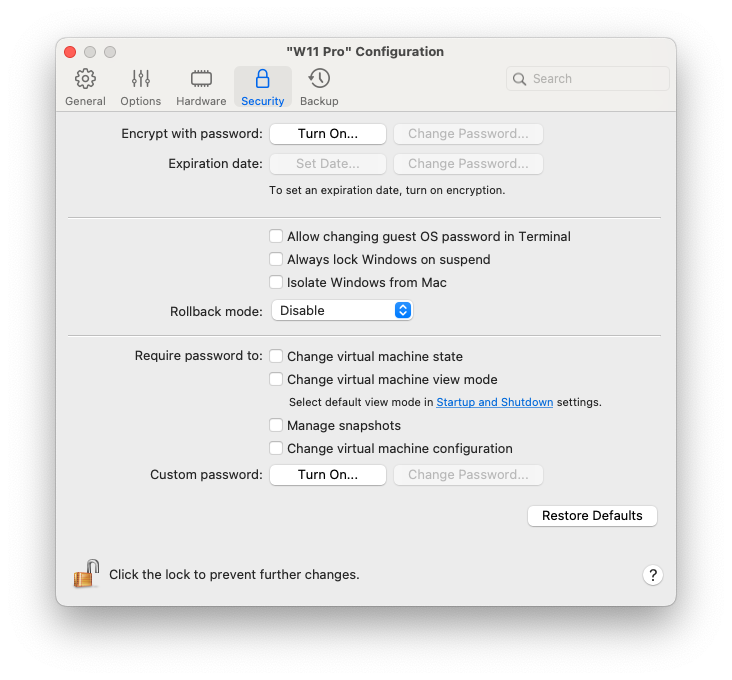
仮想マシンの構成の **\[セキュリティ]** タブで、仮想マシンの Mac からの独立、仮想マシンの操作の際に加えた変更を保存するか破棄するかの選択、特定のタスクのパスワード必須の設定などを実行できます。

{% hint style="info" %}
**注**： このパネルのオプションは、仮想マシンの設定によっては一部またはすべてが使用できない場合があります。これは、Parallels Desktop のインストールが企業の [Enterprise Edition](https://www.parallels.com/products/desktop/enterprise/) 設定の一部であり、仮想マシンのセキュリティが会社のシステム管理者によって中央管理されていることを意味します。
{% endhint %}

この設定を開くには、**\[アクション]** > **\[構成]** を選択し、**\[セキュリティ]** をクリックします。

<figure><img src="https://content.gitbook.com/content/yW32bt55qpQ60Sjv48dc/blobs/3iEpkKjO887JfnBJWo46/Screenshot%202024-01-20%20at%2001.16.46.png" alt="" width="549"><figcaption></figcaption></figure>

<table><thead><tr><th width="263">オプション</th><th>説明</th></tr></thead><tbody><tr><td><strong>パスワードで暗号化</strong></td><td>この設定を使用して、仮想マシンの暗号化で使用されるパスワードを指定、変更、またはオフにすることができます。</td></tr><tr><td><strong>[有効期限]</strong>（Parallels Desktop for Mac Business Edition でのみ利用できます）</td><td>仮想マシンが暗号化される場合、仮想マシンの有効期間が切れるまでの有効期限を設定できます。</td></tr><tr><td><strong>[ターミナルでゲスト OS のパスワードの変更を許可する]</strong>（Parallels Desktop for Mac Business Edition でのみ利用できます）</td><td>ターミナルでゲスト OS のパスワードを変更できるようにするには、このオプションを選択します。</td></tr><tr><td><strong>[サスペンド時は常に Windows をロック]</strong>（Parallels Desktop for Mac Business Edition でのみ利用できます）</td><td>サスペンド時に Windows をロックする場合は、このオプションを選択します。仮想マシンがレジュームされたら、Windows にログインしてロックを解除する必要があります。</td></tr><tr><td><strong>Mac から Windows を分離する</strong></td><td>macOS から仮想マシンを分離するには、このオプションを選択します。これにより、フォルダー、プロファイル、およびアプリケーションの共有、接続された外部デバイスへのゲスト OS からの自動的なアクセス、仮想マシンと Mac の間のボリュームの同期、仮想マシンと macOS の間のオブジェクトのコピーおよび移動は、すべて行われなくなります。仮想マシンを macOS から分離すると、片方の OS で感染したアイテムがもう一方の OS に接触することがなくなるため、セキュリティを強化することができます。</td></tr><tr><td><strong>ロールバックモード</strong>（Parallels Desktop for Mac Pro Edition と Business Edition でのみ利用できます）</td><td><p>このメニューを使用して、仮想マシンをロールバックモードで起動するかどうかを指定します。このモードにより、仮想マシンの操作中に加えた変更を保存または破棄することができます。</p><ul><li><strong>無効</strong>: 仮想マシンをロールバックモードで操作しない場合は、このオプションを選択します。</li><li><strong>変更を破棄する</strong>: 変更を保存しない場合は、このオプションを選択します。</li><li><strong>処理を確認する</strong>: 変更を保存するかどうかを判断する場合は、このオプションを選択します。仮想マシンをシャットダウンするとき、変更を保存するか破棄するかを確認するメッセージが表示されます。</li></ul></td></tr><tr><td><strong>次の場合にパスワードを要求する</strong></td><td>セキュリティを強化するため、Parallels Desktop が管理者パスワードを要求する処理を選択できます。</td></tr><tr><td><strong>カスタムパスワード</strong>（Parallels Desktop for Mac Pro Edition と Business Edition でのみ利用できます）</td><td>この設定を使用して、<strong>[次の場合にパスワードを要求する]</strong> セクションの処理を実行するときに要求されるカスタムパスワードを指定します。</td></tr></tbody></table>


---

# Agent Instructions
This documentation is published with GitBook. GitBook is the documentation platform designed so that both humans and AI agents can read, navigate, and reason over technical content effectively. Learn more at gitbook.com.

## Querying This Documentation
If you need additional information that is not directly available in this page, you can query the documentation dynamically by asking a question.

Perform an HTTP GET request on the current page URL with the `ask` query parameter, and the optional `goal` query parameter:

```
GET https://docs.parallels.com/landing/pdfm-ug/v20-ja-jp/parallels-desktop-for-mac-20-yzzugaido/parallels-desktop-tomashin/mashin/sekyuriti.md?ask=<question>&goal=<endgoal>
```

`ask` is the immediate question: it should be specific, self-contained, and written in natural language.
`goal` is optional and describes the broader end goal you are ultimately trying to accomplish on behalf of the user. GitBook uses it to tailor the answer towards what is most useful for that goal.

The response will contain a direct answer to the question and relevant excerpts and sources from the documentation.

Use this mechanism when the answer is not explicitly present in the current page, you need clarification or additional context, or you want to retrieve related documentation sections.
