> For the complete documentation index, see [llms.txt](https://docs.parallels.com/landing/llms.txt). Markdown versions of documentation pages are available by appending `.md` to page URLs; this page is available as [Markdown](https://docs.parallels.com/landing/pdfm-ug/v20-zh-tw/parallels-desktop-for-mac-20-shi-yong-zhi-nan/jin-jie-zhu-ti/shi-yong-xu-ni-ji-qi/she-ding-fen-pei-gei-xu-ni-ji-qi-de-chu-li-qi-shu-liang.md).
# 設定分配給虛擬機器的處理器數量
Parallels Desktop for Mac 會根據您 Mac 的 CPU 中的實體核心數自動計算允許的虛擬 CPU 最大數量。以下是系統中 N 個邏輯核心的分配方式 (在 Apple Silicon 系統中,N 通常等於實體核心數,而在 Intel 型的系統中,歸功於超執行緒技術,N 通常是實體核心數的兩倍):
設定檔*
自動分配的虛擬核心數
生產力與軟體測試
N<8 時為 2 個虛擬核心,否則為 4 個
僅遊戲
大於或等於 N/2 的最小偶數 (例如,16 核心 CPU 為 8,18 核心 CPU 為 10)
設計與軟體開發
小於或等於 N/2 的最大偶數 (例如,16 核心 CPU 為 8,18 核心 CPU 為 8)
所有其他案例
2 個虛擬核心
\*如需瞭解有關設定檔的詳細資訊,請參閱指南的[本頁面](/landing/pdfm-ug/v20-zh-tw/parallels-desktop-for-mac-20-shi-yong-zhi-nan/zai-mac-shang-shi-yong-windows/zui-jia-hua-xiao-neng/zui-jia-hua-you-xi-tu-xing-chan-neng-huo-kai-fa-de-xu-ni-ji-qi.md)。
但是,如果經常同時執行多個虛擬機器,自動分配核心可能會導致資源衝突。我們建議手動設定指派給每個虛擬機器的 CPU 數量。如需手動核心分配限制,請參閱[此頁面](/landing/pdfm-ug/v20-zh-tw/parallels-desktop-for-mac-20-shi-yong-zhi-nan/parallels-desktop-pian-hao-she-ding-he-xu-ni-ji-qi-she-ding/xu-ni-ji-qi-she-ding/ying-ti-she-ding/cpu-ji-ji-yi-ti-she-ding.md)。
{% hint style="warning" %}
**附註:**儘管大多數現代應用程式都是針對多核心處理器而設計的,但並非所有應用程式都能同樣受益於增加可用的核心數量。增加虛擬核心數量不一定總是會帶來相應的效能提升。
{% endhint %}
要設定給一個虛擬機器分配多少個處理器:
1. [關閉虛擬機器](/landing/pdfm-ug/v20-zh-tw/parallels-desktop-for-mac-20-shi-yong-zhi-nan/zai-mac-shang-shi-yong-windows/kai-shi-shi-yong/guan-bi-huo-zhong-zhi-windows.md)。
2. 開啟「**動作**」功能表並選取「**組態**」。
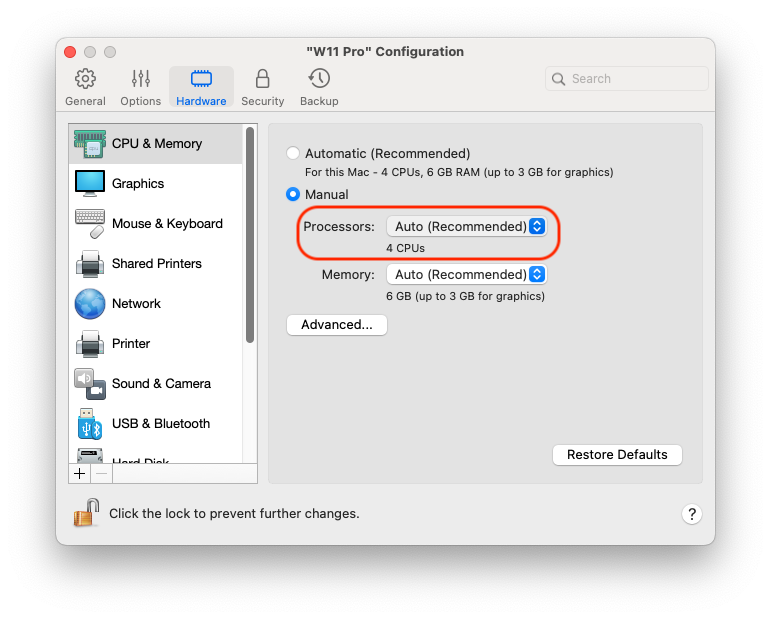
3. 按一下「**硬體 > CPU 和記憶體**」並從「**處理器**」功能表選取一個數目。
{% hint style="info" %}
**附註:**在 Parallels Desktop for Mac 中,您最多可以指派 4 個核心給一部虛擬機器。在 Parallels Desktop for Mac Pro 版中,您最多可以指派 16 個核心。
{% endhint %}
---
# Agent Instructions
This documentation is published with GitBook. GitBook is the documentation platform designed so that both humans and AI agents can read, navigate, and reason over technical content effectively. Learn more at gitbook.com.
## Querying This Documentation
If you need additional information that is not directly available in this page, you can query the documentation by asking a question.
Perform an HTTP GET request on the following URL with the `ask` and `goal` query parameters:
```
GET https://docs.parallels.com/landing/pdfm-ug/v20-zh-tw/parallels-desktop-for-mac-20-shi-yong-zhi-nan/jin-jie-zhu-ti/shi-yong-xu-ni-ji-qi/she-ding-fen-pei-gei-xu-ni-ji-qi-de-chu-li-qi-shu-liang.md?ask=&goal=
```
`ask` is the immediate question: it should be specific, self-contained, and written in natural language.
`goal` is what the user is ultimately trying to achieve, the reason they need the answer. Sharing it helps GitBook give you a better, more relevant answer. A goal is most helpful when it describes the outcome the user wants rather than restating the question. For example, with `ask=how do I create an API token`, a goal like `automate deployments from our CI pipeline` lets GitBook tailor the answer to that use case.
The response will contain a direct answer to the question and relevant excerpts and sources from the documentation.
Use this mechanism when the answer is not explicitly present in the current page, you need clarification or additional context, or you want to retrieve related documentation sections.