> For the complete documentation index, see [llms.txt](https://docs.parallels.com/landing/llms.txt). Markdown versions of documentation pages are available by appending `.md` to page URLs; this page is available as [Markdown](https://docs.parallels.com/landing/pdfm-ug/v20-zh-tw/parallels-desktop-for-mac-20-shi-yong-zhi-nan/parallels-desktop-pian-hao-she-ding-he-xu-ni-ji-qi-she-ding/parallels-desktop-pian-hao-she-ding/jin-jie-pian-hao-she-ding.md).

# 進階偏好設定

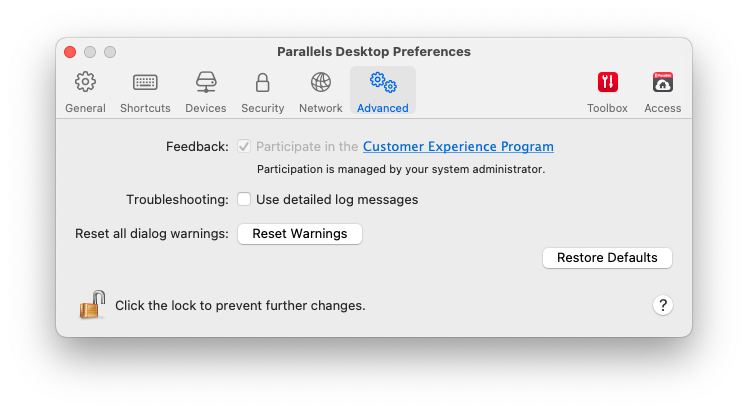
使用「**進階**偏好設定」參與客戶體驗計劃、重設隱藏的訊息，並使 Parallels Desktop 建立更詳細的記錄檔。

若要開啟這些設定，選擇「**Parallels Desktop**」>「**偏好設定**」，然後按一下「**進階**」。

<figure><img src="https://content.gitbook.com/content/NPLQPyrTCZG7rj2GnqwJ/blobs/PYjlK7Do4p9rBzF6DE22/Screenshot%202024-01-19%20at%2012.57.11.png" alt="" width="561"><figcaption></figcaption></figure>

<table><thead><tr><th width="201">選項</th><th>描述</th></tr></thead><tbody><tr><td><strong>回饋</strong></td><td><p>如果您協助我們讓 Parallels Desktop 更符合您的需求，請選取「<strong>加入客戶體驗計畫</strong>」。Parallels 將收集您的 Mac 和虛擬機器配置的相關資訊。<br></p><p><strong>注意：</strong>任何類型的隱私資訊，比如您的名字、e-mail、位址、電話號碼以及鍵盤輸入，<em>將不會</em>被收集。</p></td></tr><tr><td><strong>故障排除</strong></td><td>Parallels Desktop 在執行時會自動建立一個日誌檔，Parallels 技術支援小組可利用該檔來解決問題與改善產品。如果您選取「<strong>使用詳細的記錄檔訊息</strong>」選項，Parallels Desktop 將開始建立一份更加詳細的記錄檔訊息。這對於 Parallels 技術支援小組將非常有幫助，但它會佔用更多的硬碟空間並且可能會降低系統效能。在 Parallels 支援團隊要求您啟用此選項之前，請勿執行此作業。</td></tr><tr><td><strong>重設所有對話警告</strong></td><td>部分 Parallels Desktop 對話方塊和視窗附帶有「<strong>下次不再顯示此訊息</strong>」的選項。如果您選取此選項，下次您執行相同的動作時相應的對話視窗將不會出現。您可以使用「<strong>重設警告</strong>」按鈕來重設所有已選取此選項的對話方塊與視窗，每次您起始相應作業時對話方塊和視窗將會再次顯示。</td></tr></tbody></table>


---

# Agent Instructions
This documentation is published with GitBook. GitBook is the documentation platform designed so that both humans and AI agents can read, navigate, and reason over technical content effectively. Learn more at gitbook.com.

## Querying This Documentation
If you need additional information that is not directly available in this page, you can query the documentation by asking a question.

Perform an HTTP GET request on the following URL with the `ask` and `goal` query parameters:

```
GET https://docs.parallels.com/landing/pdfm-ug/v20-zh-tw/parallels-desktop-for-mac-20-shi-yong-zhi-nan/parallels-desktop-pian-hao-she-ding-he-xu-ni-ji-qi-she-ding/parallels-desktop-pian-hao-she-ding/jin-jie-pian-hao-she-ding.md?ask=<question>&goal=<user_goal>
```

`ask` is the immediate question: it should be specific, self-contained, and written in natural language.
`goal` is what the user is ultimately trying to achieve, the reason they need the answer. Sharing it helps GitBook give you a better, more relevant answer. A goal is most helpful when it describes the outcome the user wants rather than restating the question. For example, with `ask=how do I create an API token`, a goal like `automate deployments from our CI pipeline` lets GitBook tailor the answer to that use case.

The response will contain a direct answer to the question and relevant excerpts and sources from the documentation.

Use this mechanism when the answer is not explicitly present in the current page, you need clarification or additional context, or you want to retrieve related documentation sections.
