> For the complete documentation index, see [llms.txt](https://docs.parallels.com/landing/llms.txt). Markdown versions of documentation pages are available by appending `.md` to page URLs; this page is available as [Markdown](https://docs.parallels.com/landing/pdfm-ug/v20-zh-tw/parallels-desktop-for-mac-20-shi-yong-zhi-nan/zai-mac-shang-shi-yong-windows/lian-jie-wang-ji-wang-lu-huo-wang-lu/zai-macos-yu-windows-zhi-jian-gong-yong-wang-lu.md).
# 在 macOS 與 Windows 之間共用網路
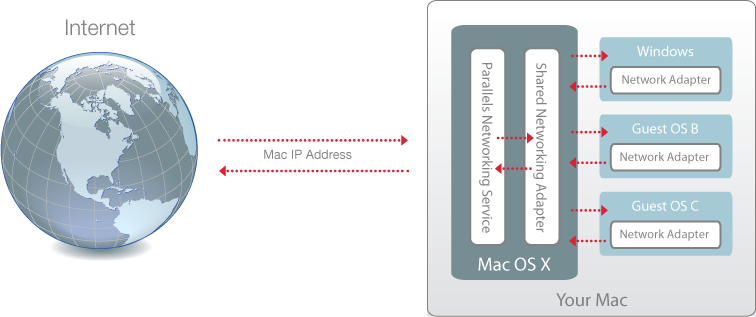
依預設,會將 Windows 設定為透過 macOS 存取網路。Windows 應用程式可以通過使用 Mac 的 IP 位址連接本地網路中的其他電腦和網際網路。Windows 本身在網路中沒有 IP 位址。
在大多數情況下,您無需調整網路設定。如果您的 Mac 已設定好網路或網際網路的連線,Windows 應用程式將可連線相同的網路和網際網路。
在下列情況中您可能希望使用共用網路模式:
* 您的 Mac 是通過數據機或其他非乙太網裝置連線網際網路。
* 您需要從 Windows 直接連線網際網路但擔心安裝問題。
* 您對於在橋接網路模式下工作有問題。
如何配置 Windows 使用共用網路:
1. 進行以下動作:
* 按一下功能表列中的 Parallels Desktop 圖示,然後選擇「**設定**」。
* 如果在螢幕頂部可以看見 Parallels Desktop 功能表列,請選擇「**動作**」>「**設定**」。
2. 按一下「**硬體**」然後按一下「**網路**」。
3. 在「**網路**」窗格中,請確定已選取「**共用網路**」選項。
要瞭解關於網路問題疑難排解的資訊,請參考 Parallels 網站上的 [Parallels 知識庫](https://kb.parallels.com/128867)。
---
# Agent Instructions
This documentation is published with GitBook. GitBook is the documentation platform designed so that both humans and AI agents can read, navigate, and reason over technical content effectively. Learn more at gitbook.com.
## Querying This Documentation
If you need additional information that is not directly available in this page, you can query the documentation by asking a question.
Perform an HTTP GET request on the following URL with the `ask` and `goal` query parameters:
```
GET https://docs.parallels.com/landing/pdfm-ug/v20-zh-tw/parallels-desktop-for-mac-20-shi-yong-zhi-nan/zai-mac-shang-shi-yong-windows/lian-jie-wang-ji-wang-lu-huo-wang-lu/zai-macos-yu-windows-zhi-jian-gong-yong-wang-lu.md?ask=&goal=
```
`ask` is the immediate question: it should be specific, self-contained, and written in natural language.
`goal` is what the user is ultimately trying to achieve, the reason they need the answer. Sharing it helps GitBook give you a better, more relevant answer. A goal is most helpful when it describes the outcome the user wants rather than restating the question. For example, with `ask=how do I create an API token`, a goal like `automate deployments from our CI pipeline` lets GitBook tailor the answer to that use case.
The response will contain a direct answer to the question and relevant excerpts and sources from the documentation.
Use this mechanism when the answer is not explicitly present in the current page, you need clarification or additional context, or you want to retrieve related documentation sections.