> For the complete documentation index, see [llms.txt](https://docs.parallels.com/landing/llms.txt). Markdown versions of documentation pages are available by appending `.md` to page URLs; this page is available as [Markdown](https://docs.parallels.com/landing/pdfm-ug/v20-zh-tw/parallels-desktop-for-mac-20-shi-yong-zhi-nan/zai-mac-shang-shi-yong-windows/shi-yong-nei-jian-huo-wai-bu-de-wang-lu-she-ying-ji.md).
# 使用內建或外部的網路攝影機
若 Mac 筆記型電腦或顯示器具有內建相機,或者連接相容的網路攝影機,依預設可在 Windows 使用。
{% hint style="info" %}
**注意**:從 Parallels Desktop for Mac 20.3.0 及更新版本開始支援 OBS 攝影機與 BGRA 色彩模式。
{% endhint %}
若要在 Windows 使用內建或外部相機:
* 簡單地開啟使用照相機的 Windows 應用程式,您將能夠選擇 iSight 或外接照相機用於該應用程式。
{% hint style="info" %}
**附註:**若您執行的客體作業系統不是 Windows 10 或 11,請務必安裝 USB 視訊類別 (UVC) 驅動程式。
{% endhint %}
### **禁用相機共用**
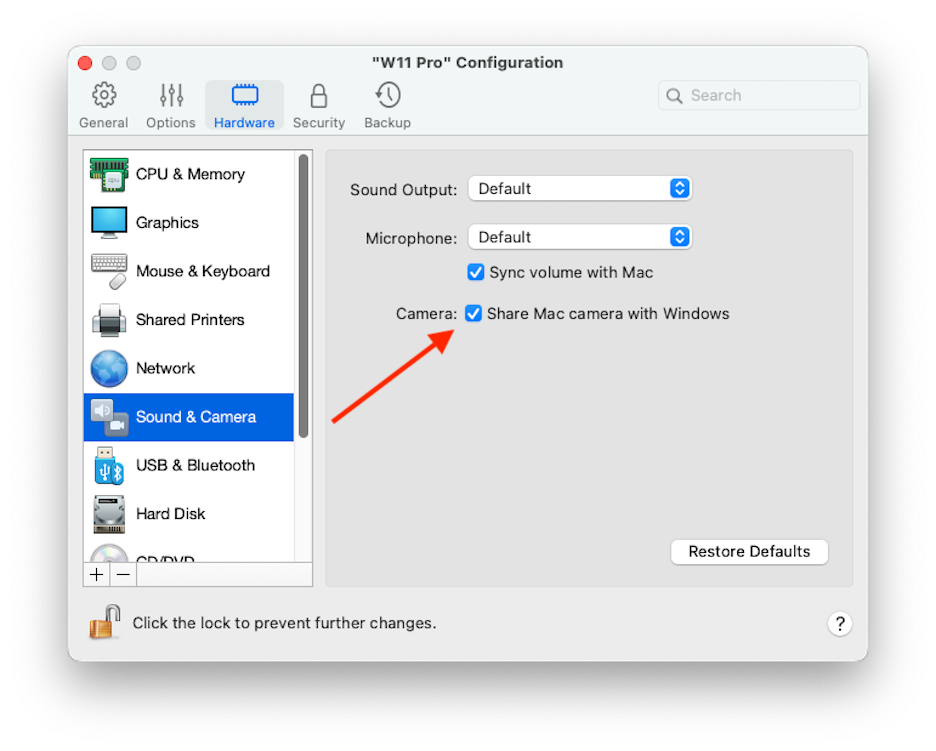
若不要讓 Windows 應用程式使用連接的網路攝影機或內建相機,則可透過以下步驟來禁用相機共用:
1. 開啟「控制中心」,以滑鼠右鍵按一下所選虛擬機器,並選擇「**設定**」。
2. 按一下「**硬體**」與「**音訊與相機**」。
3. 取消選取「**相機**」。
---
# Agent Instructions
This documentation is published with GitBook. GitBook is the documentation platform designed so that both humans and AI agents can read, navigate, and reason over technical content effectively. Learn more at gitbook.com.
## Querying This Documentation
If you need additional information that is not directly available in this page, you can query the documentation by asking a question.
Perform an HTTP GET request on the following URL with the `ask` and `goal` query parameters:
```
GET https://docs.parallels.com/landing/pdfm-ug/v20-zh-tw/parallels-desktop-for-mac-20-shi-yong-zhi-nan/zai-mac-shang-shi-yong-windows/shi-yong-nei-jian-huo-wai-bu-de-wang-lu-she-ying-ji.md?ask=&goal=
```
`ask` is the immediate question: it should be specific, self-contained, and written in natural language.
`goal` is what the user is ultimately trying to achieve, the reason they need the answer. Sharing it helps GitBook give you a better, more relevant answer. A goal is most helpful when it describes the outcome the user wants rather than restating the question. For example, with `ask=how do I create an API token`, a goal like `automate deployments from our CI pipeline` lets GitBook tailor the answer to that use case.
The response will contain a direct answer to the question and relevant excerpts and sources from the documentation.
Use this mechanism when the answer is not explicitly present in the current page, you need clarification or additional context, or you want to retrieve related documentation sections.