> For the complete documentation index, see [llms.txt](https://docs.parallels.com/landing/llms.txt). Markdown versions of documentation pages are available by appending `.md` to page URLs; this page is available as [Markdown](https://docs.parallels.com/landing/pdfm-ug/v26-it-it/guida-utente-di-parallels-desktop-per-mac-26/usa-windows-sul-mac/utilizzo-della-webcam-integrata-o-di-una-webcam-esterna.md).
# Utilizzo della webcam integrata o di una webcam esterna
Se il Mac o il monitor ha una camera integrata o se connetti una webcam esterna compatibile, puoi utilizzarla su Windows per impostazione predefinita.
{% hint style="info" %}
**Nota**: La camera OBS e il modello di colore BGRA sono supportati a partire da Parallels Desktop per Mac versione 20.3.0 e successive.
{% endhint %}
Per usare una webcam esterna o integrata con Windows:
* Basta semplicemente aprire un’applicazione Windows che utilizzi una webcam e selezionare iSight o una webcam esterna da usare con l’applicazione.
{% hint style="info" %}
**Nota:** Se stai eseguendo un sistema operativo guest diverso da Windows 10 o 11, accertati che i driver USB video class (UVC) siano installati.
{% endhint %}
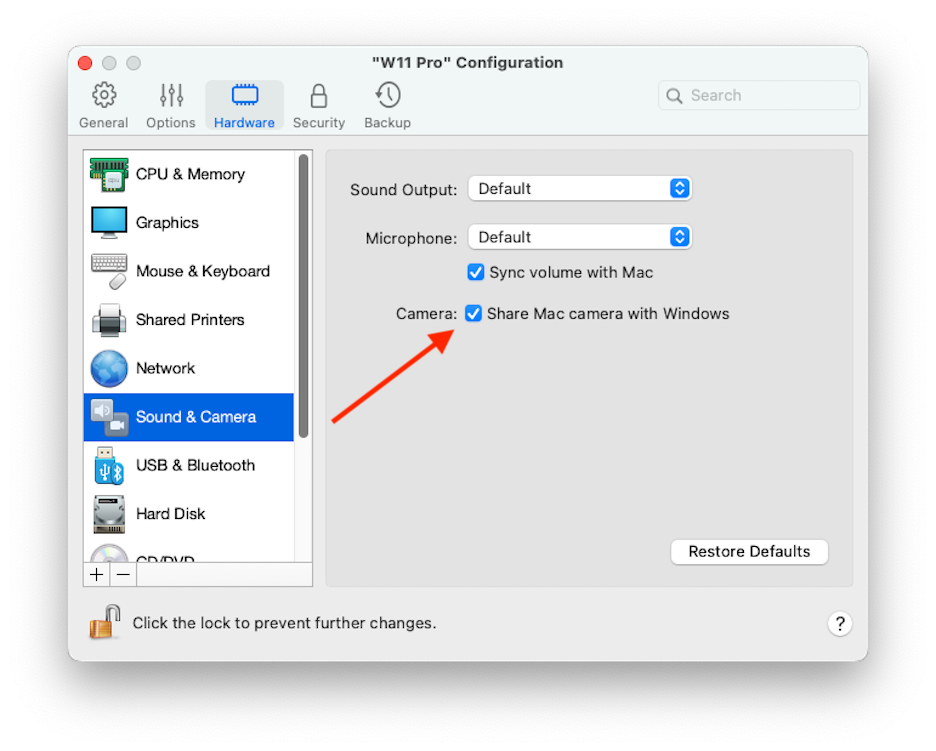
### Disab**ilita la condivisione della webcam**
Se non vuoi che le applicazioni Windows possano utilizzare webcam connesse o la webcam integrata, puoi disabilitare la condivisione della webcam nel modo seguente:
1. Apri il Centro di controllo, fai clic con il pulsante destro del mouse sulla macchina virtuale scelta e seleziona **Configura**.
2. Fai clic su **Hardware** e poi su **Audio e webcam**.
3. Deseleziona **Webcam**.
---
# Agent Instructions
This documentation is published with GitBook. GitBook is the documentation platform designed so that both humans and AI agents can read, navigate, and reason over technical content effectively. Learn more at gitbook.com.
## Querying This Documentation
If you need additional information that is not directly available in this page, you can query the documentation dynamically by asking a question.
Perform an HTTP GET request on the current page URL with the `ask` query parameter, and the optional `goal` query parameter:
```
GET https://docs.parallels.com/landing/pdfm-ug/v26-it-it/guida-utente-di-parallels-desktop-per-mac-26/usa-windows-sul-mac/utilizzo-della-webcam-integrata-o-di-una-webcam-esterna.md?ask=&goal=
```
`ask` is the immediate question: it should be specific, self-contained, and written in natural language.
`goal` is optional and describes the broader end goal you are ultimately trying to accomplish on behalf of the user. GitBook uses it to tailor the answer towards what is most useful for that goal.
The response will contain a direct answer to the question and relevant excerpts and sources from the documentation.
Use this mechanism when the answer is not explicitly present in the current page, you need clarification or additional context, or you want to retrieve related documentation sections.