> For the complete documentation index, see [llms.txt](https://docs.parallels.com/landing/llms.txt). Markdown versions of documentation pages are available by appending `.md` to page URLs; this page is available as [Markdown](https://docs.parallels.com/landing/pdfm-ug/v26-ja-jp/parallels-desktop-for-mac-26-yzzugaido/na/mashinno/mashindenapurosessno.md).
# 仮想マシンで使用可能なプロセッサー数の設定
Parallels Desktop for Mac では、Mac に搭載されている CPU の物理コア数に基づき仮想 CPU の最大許容数が自動的に計算されます。以下は、システム内に存在する N 個の論理コア(Apple Silicon システムの場合、N は通常、物理コア数に等しく、Intel ベースのシステムの場合、ハイパースレッディングの効果により、物理コア数の 2 倍になります)に関する割り当ての仕組みです。
プロファイル*
自動的に割り当てられる仮想コア数
生産性向上とソフトウェアテスト
N<8 の場合は 2 個の仮想コア、それ以外は 4 個の仮想コア
ゲームのみ
N/2 以上の最小の偶数(例: 16 コア CPU の場合は 8、18 コア CPU では 10)
デザインとソフトウェア開発
N/2 以下の最大の偶数(たとえば、16 コア CPU の場合は 8、18 コア CPU でも 8)。
他のすべてのシナリオ
2 個の仮想コア
\*プロファイルの詳細については、ガイドの[こちらのページ](/landing/pdfm-ug/v26-ja-jp/parallels-desktop-for-mac-26-yzzugaido/mac-de-windows-wosuru/pafmansuno/gmugurafikkutsrumatahanimashinwosuru.md)を参照してください。
ただし、複数の仮想マシンを同時に実行することが多い場合、コアの自動割り当てはリソースの競合につながる可能性があります。各仮想マシンに割り当てる CPU の数は、手動で設定することをお勧めします。手動コア割り当て制限については、[こちらのページ](/landing/pdfm-ug/v26-ja-jp/parallels-desktop-for-mac-26-yzzugaido/parallels-desktop-tomashin/mashin/hdowea/cpu-tomemorino.md)を参照してください。
{% hint style="warning" %}
**注:** 最近のアプリのほとんどはマルチコアプロセッサーを念頭に設計されていますが、利用可能なコア数を均等に増やしたからといって、すべてのアプリが恩恵を受けるわけではありません。仮想コアの数を増やしても、必ずしもそれに見合ったパフォーマンスの向上が見られるとは限りません。
{% endhint %}
仮想マシンで使用可能なプロセッサ数を設定するには、以下の操作を実行します。
1. [仮想マシンをシャットダウンします](/landing/pdfm-ug/v26-ja-jp/parallels-desktop-for-mac-26-yzzugaido/mac-de-windows-wosuru/imeru/windows-noshattodaunmatahasasupendo.md)。
2. **\[処理]** メニューを開いて、**\[構成]** を選択します。
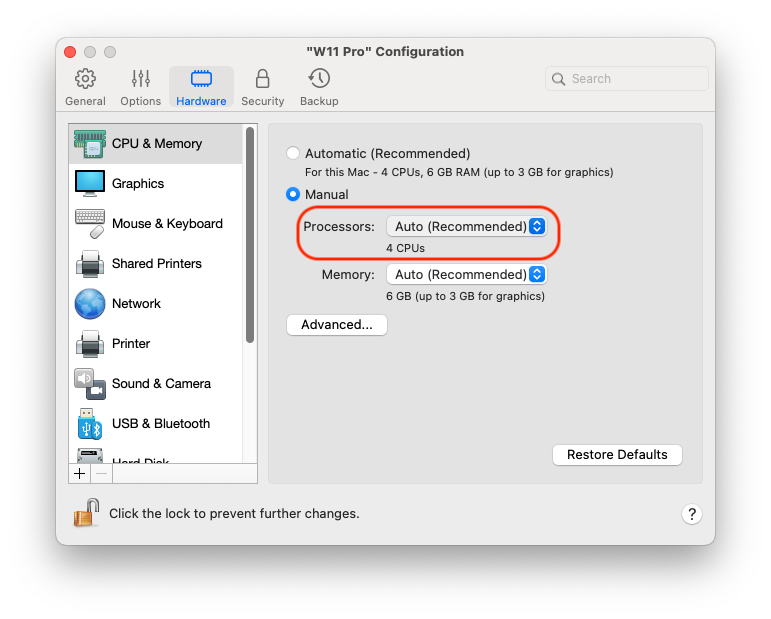
3. **\[ハードウェア] > \[CPU とメモリ]** をクリックし、**\[プロセッサ]** メニューで数を選択します。
{% hint style="info" %}
**注:** Parallels Desktop for Mac では、最大 4 個のコアを仮想マシンに割り当てることができます。Parallels Desktop for Mac Pro Edition では、最大 16 個のコアを割り当てることができます。
{% endhint %}
---
# Agent Instructions
This documentation is published with GitBook. GitBook is the documentation platform designed so that both humans and AI agents can read, navigate, and reason over technical content effectively. Learn more at gitbook.com.
## Querying This Documentation
If you need additional information that is not directly available in this page, you can query the documentation dynamically by asking a question.
Perform an HTTP GET request on the current page URL with the `ask` query parameter, and the optional `goal` query parameter:
```
GET https://docs.parallels.com/landing/pdfm-ug/v26-ja-jp/parallels-desktop-for-mac-26-yzzugaido/na/mashinno/mashindenapurosessno.md?ask=&goal=
```
`ask` is the immediate question: it should be specific, self-contained, and written in natural language.
`goal` is optional and describes the broader end goal you are ultimately trying to accomplish on behalf of the user. GitBook uses it to tailor the answer towards what is most useful for that goal.
The response will contain a direct answer to the question and relevant excerpts and sources from the documentation.
Use this mechanism when the answer is not explicitly present in the current page, you need clarification or additional context, or you want to retrieve related documentation sections.