> For the complete documentation index, see [llms.txt](https://docs.parallels.com/landing/llms.txt). Markdown versions of documentation pages are available by appending `.md` to page URLs; this page is available as [Markdown](https://docs.parallels.com/landing/pdfm-ug/v26-zh-tw/parallels-desktop-for-mac-26-shi-yong-zhi-nan/an-zhuang-huo-sheng-ji-parallels-desktop/sheng-ji-parallels-desktop/an-zhuang-ruan-ti-geng-xin.md).
# 安裝軟體更新
Parallels 會定期地提供免費的更新以提升 Parallels Desktop。
在預設情況下,Parallels Desktop 已配置為每週一次自動查找並下載可用軟體更新。每當一個更新發行可使用的時,Parallels Desktop 就會提示您安裝該更新。只需簡單按照說明進行操作即可。
{% hint style="info" %}
**附註**:Parallels Desktop for App Store 會透過 Mac App Store 更新程序來接收更新。如需 Standard Edition 和 App Store Edition 差異的詳細資訊,請前往此[連結](https://kb.parallels.com/123796)。
{% endhint %}
### **調整軟體更新設定**
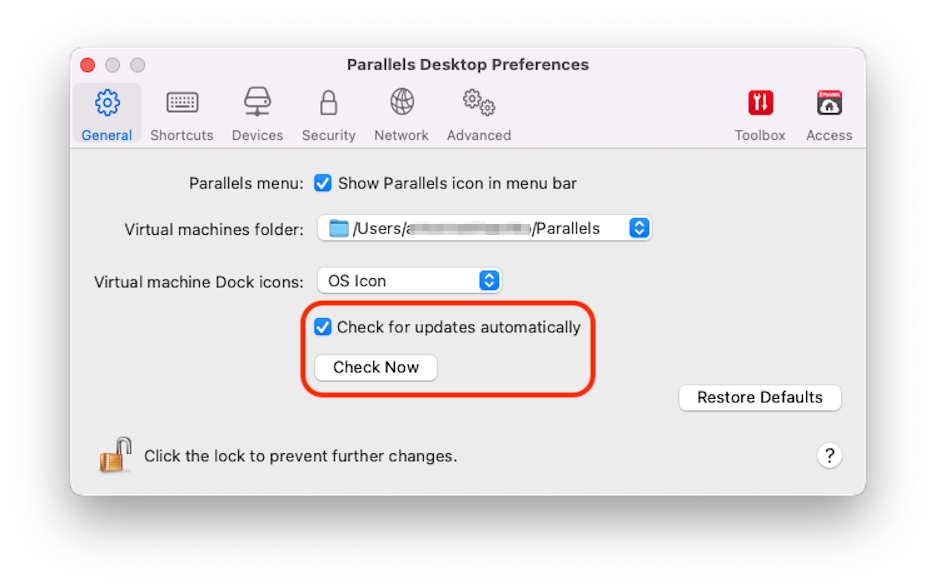
* 按一下功能表列中的 Parallels 圖示,然後選擇「**偏好設定**」。然後按一下「**通用**」。
* 在 Dock 中以滑鼠右鍵按一下「Parallels Desktop」圖示,並選擇「**偏好設定**」。然後按一下「**通用**」。
* 要選擇 Parallels Desktop 是否自動下載更新,可選擇或取消選擇**自動下載更新**。
如果您選擇不自動下載更新,Parallels Desktop 將在有可用更新時通知並詢問您是否要下載。
---
# Agent Instructions
This documentation is published with GitBook. GitBook is the documentation platform designed so that both humans and AI agents can read, navigate, and reason over technical content effectively. Learn more at gitbook.com.
## Querying This Documentation
If you need additional information that is not directly available in this page, you can query the documentation by asking a question.
Perform an HTTP GET request on the following URL with the `ask` and `goal` query parameters:
```
GET https://docs.parallels.com/landing/pdfm-ug/v26-zh-tw/parallels-desktop-for-mac-26-shi-yong-zhi-nan/an-zhuang-huo-sheng-ji-parallels-desktop/sheng-ji-parallels-desktop/an-zhuang-ruan-ti-geng-xin.md?ask=&goal=
```
`ask` is the immediate question: it should be specific, self-contained, and written in natural language.
`goal` is what the user is ultimately trying to achieve, the reason they need the answer. Sharing it helps GitBook give you a better, more relevant answer. A goal is most helpful when it describes the outcome the user wants rather than restating the question. For example, with `ask=how do I create an API token`, a goal like `automate deployments from our CI pipeline` lets GitBook tailor the answer to that use case.
The response will contain a direct answer to the question and relevant excerpts and sources from the documentation.
Use this mechanism when the answer is not explicitly present in the current page, you need clarification or additional context, or you want to retrieve related documentation sections.