> For the complete documentation index, see [llms.txt](https://docs.parallels.com/landing/llms.txt). Markdown versions of documentation pages are available by appending `.md` to page URLs; this page is available as [Markdown](https://docs.parallels.com/landing/pdfm-ug/v26-zh-tw/parallels-desktop-for-mac-26-shi-yong-zhi-nan/parallels-desktop-pian-hao-she-ding-he-xu-ni-ji-qi-she-ding/xu-ni-ji-qi-she-ding/ying-ti-she-ding/cpu-ji-ji-yi-ti-she-ding.md).

# CPU 及記憶體設定

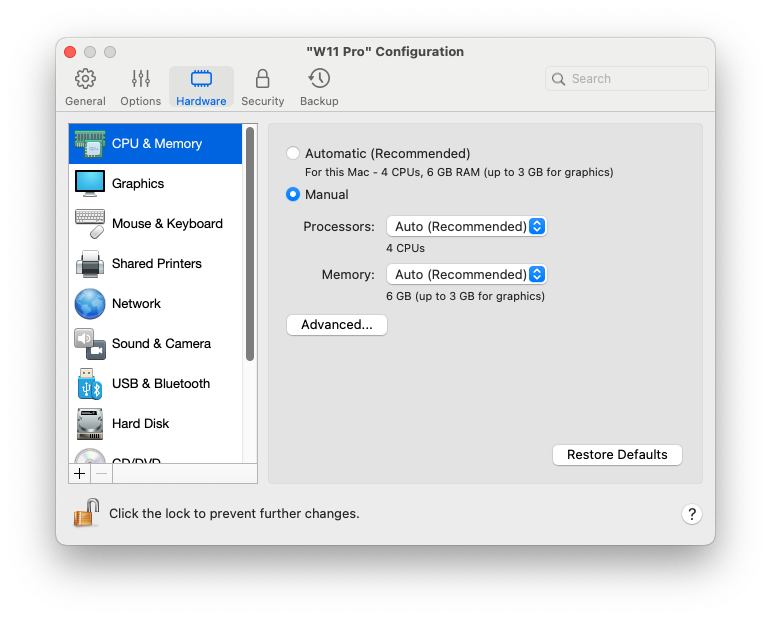
在「**CPU 及記憶體**」窗格，您可以檢視和設定 CPU 和記憶體相關設定。

若要開啟這些設定，請選擇「**動作**」>「**設定**」>「**硬體**」，然後按一下「**CPU 及記憶體**」。

<figure><img src="https://content.gitbook.com/content/hzcj9yKOKgjEsgwHkTST/blobs/jdt22pXE6f2ax3pvgJ78/Screenshot%202024-01-19%20at%2017.46.41.png" alt="" width="563"><figcaption></figcaption></figure>

<table><thead><tr><th width="288.1328125">選項</th><th>描述</th></tr></thead><tbody><tr><td><strong>CPU 及記憶體分配</strong></td><td><p>如果您使用 Windows 10 或更新版本，Parallels Desktop 會自動將所需的 CPU 數量和記憶體數量分配至虛擬機器，讓您獲得最佳效能和良好體驗。建議您使用預設設定。</p><p>不過，如果您對虛擬機器的效能不滿意，可以手動指定虛擬機器可使用的 CPU 和記憶體數量。選取「<strong>手動</strong>」，並從對應欄位中選擇所需的值。</p><p>在 Parallels Desktop for Mac Standard Edition 中建立和執行的虛擬機器僅限於 4 個 vCPU 核心和 8 GB vRAM。對於 Pro and Business/Enterprise Editions，限制如下：</p><ul><li>Intel Macs 最多 32 個 vCPU 核心，Apple 矽晶片 Macs 最多 18 個 vCPU 核心 (最大測試數量)。</li><li>最高 128GB 記憶體。</li></ul><p>請注意，數量不一定<em>越多</em>越好。請先嘗試以預設設定使用虛擬機器。如果運作緩慢嘗試增加更多記憶體和/或提升 CPU 數量。如果虛擬機器有變快，則沒問題。如果沒有變快，請嘗試改以其他方式分配 CPU 和記憶體。由於虛擬機器的效能取決於 Mac 的硬體、在 Mac 上執行的應用程式、負責運行虛擬機器的影用程式等因素，因此要提供直接單純的指示並不容易。</p><p>如果您使用的虛擬機器搭載 Windows 8.1 或更舊版本、Linux 或 macOS 作業系統，您可以使用「<strong>處理器</strong>」和「<strong>記憶體</strong>」功能表來選擇要使用的 CPU 和記憶體數量。</p></td></tr><tr><td><p><strong>高級 > Hypervisor</strong><br></p><p>此功能表僅適用於配備 Intel 處理器的 Mac 電腦。在 Apple 矽晶片 Macs 上建立的虛擬機器一律使用 Apple Hypervisor。</p></td><td>在此功能表中，您可以選擇是否要從 Parallels 或 Apple 使用 Hypervisor。建議您使用 Parallels Hypervisor。</td></tr><tr><td><strong>高級 > 調適型 Hypervisor</strong></td><td>選取此選項，將 Parallels Desktop 設定為根據當前使用的應用程式自動最佳化虛擬機器或 macOS 的效能。使用虛擬機器應用程式時，會將更多資源提供給虛擬機器，而當您使用 macOS 應用程式時，則會將更多資訊提供給 macOS。</td></tr><tr><td><p><strong>高級 > 啟用巢狀虛擬化</strong><br></p><p>此功能表僅適用於在配備 Intel 處理器的 Mac 上所安裝的 Parallels Desktop for Mac Pro 和 Business/Enterprise Editions，且虛擬機器需配置使用 Parallels Hypervisor。<br><br><strong>注意</strong>：在 Apple silicon Mac 上，Linux 虛擬機上支援巢狀虛擬化，專門用於執行 Linux 虛擬機。它要求您的 Mac 採用 M3 晶片或更高規格，並執行 macOS Sequoia 15.0 或更新版本。</p></td><td><p>選取此選項以啟用巢狀虛擬化支援。Parallels Desktop 可讓您執行：</p><ul><li>Windows 8 或更新版本、Windows Server 2012 或更新版虛擬機器中的 Hyper-V 虛擬機器。</li><li>macOS 虛擬機器內的 Parallels Desktop。</li><li>VMware ESXi 虛擬機器。</li><li>支援 Xen 和 KVM 之 Linux 版本中的 Xen 和核心型虛擬機器。</li></ul><p><strong>附註：</strong>在虛擬機器內執行虛擬機器可能會大幅減慢 macOS 及虛擬機器的效能。<br></p><p>如果您使用 Parallels 虛擬機器來建置、偵錯和測試應用程式，請啟用巢狀虛擬化來安裝和使用：</p><ul><li>適用於 Visual Studio 的 Android 模擬器。</li><li>適用於 Visual Studio 的 iPhone 模擬器。</li><li>Xamarin.Android。</li><li>Android Studio。</li><li>Embarcadero RAD Studio。</li><li>Docker for Windows。</li><li>Microsoft Visual Studio + TwinCat 3 (對於 TwinCat 3 的支援仍在測試中，可能會有一些錯誤)。</li></ul></td></tr></tbody></table>


---

# Agent Instructions
This documentation is published with GitBook. GitBook is the documentation platform designed so that both humans and AI agents can read, navigate, and reason over technical content effectively. Learn more at gitbook.com.

## Querying This Documentation
If you need additional information that is not directly available in this page, you can query the documentation by asking a question.

Perform an HTTP GET request on the following URL with the `ask` and `goal` query parameters:

```
GET https://docs.parallels.com/landing/pdfm-ug/v26-zh-tw/parallels-desktop-for-mac-26-shi-yong-zhi-nan/parallels-desktop-pian-hao-she-ding-he-xu-ni-ji-qi-she-ding/xu-ni-ji-qi-she-ding/ying-ti-she-ding/cpu-ji-ji-yi-ti-she-ding.md?ask=<question>&goal=<user_goal>
```

`ask` is the immediate question: it should be specific, self-contained, and written in natural language.
`goal` is what the user is ultimately trying to achieve, the reason they need the answer. Sharing it helps GitBook give you a better, more relevant answer. A goal is most helpful when it describes the outcome the user wants rather than restating the question. For example, with `ask=how do I create an API token`, a goal like `automate deployments from our CI pipeline` lets GitBook tailor the answer to that use case.

The response will contain a direct answer to the question and relevant excerpts and sources from the documentation.

Use this mechanism when the answer is not explicitly present in the current page, you need clarification or additional context, or you want to retrieve related documentation sections.
