> For the complete documentation index, see [llms.txt](https://docs.parallels.com/landing/llms.txt). Markdown versions of documentation pages are available by appending `.md` to page URLs; this page is available as [Markdown](https://docs.parallels.com/landing/pdfm-ug/v27-de-de/parallels-desktop-for-mac-27-handbuch/weitere-themen/host-exklusive-netzwerkeinstellungen.md).
# Host-exklusive Netzwerkeinstellungen
{% hint style="info" %}
**Hinweis:** Host-exklusive Netzwerkeinstellungen sind nur in Parallels Desktop für Mac Pro und Business/Enterprise Edition verfügbar.\
\
Wenn Sie einen Apple Silicon Mac haben und eine virtuelle Maschine mit macOS im Host-exklusive-Modus ausführen möchten, müssen Sie das Betriebssystem Ihres Macs auf macOS Sequoia 15 oder neuer und Parallels Desktop auf Version 20.4.0 oder neuer aktualisieren.
{% endhint %}
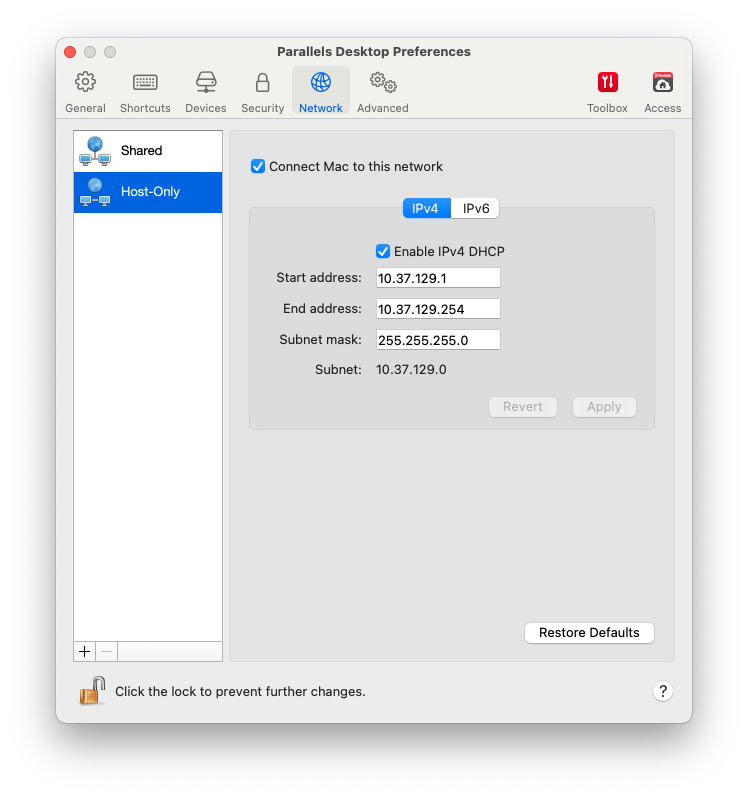
Um die Host-exklusiven Netzwerkeinstellungen zu ändern, wählen Sie die Registerkarte **Netzwerk** der Parallels Desktop-Einstellungen, und klicken Sie auf **Host-exklusiv**. Daraufhin wird folgendes Fenster eingeblendet:
In diesem Fenster können Sie die Einstellungen von den Parallels DHCP-Servern für IPv4 und IPv6 entsprechend ändern. Diese Server sind standardmäßig aktiviert und weisen den virtuellen Maschinen, die im Host-exklusiven Netzwerkmodus ausgeführt werden, automatisch IP-Adressen zu. Wenn Sie einen der Server deaktivieren möchten, entfernen Sie das Häkchen im entsprechenden Kontrollkästchen.
Wenn Sie die Standardeinstellungen wiederherstellen möchten, klicken Sie auf **Standard wiederherstellen**.
Weitere Informationen zur Konfiguration der Host-exklusiven Netzwerkeinstellungen finden Sie unter [**Verwenden von Host-exklusiven Netzwerkeinstellungen**](/landing/pdfm-ug/v27-de-de/parallels-desktop-for-mac-27-handbuch/windows-auf-dem-mac-benutzen/verbinden-mit-dem-internet-oder-einem-netzwerk/host-exklusive-netzwerkeinstellungen.md).
---
# Agent Instructions
This documentation is published with GitBook. GitBook is the documentation platform designed so that both humans and AI agents can read, navigate, and reason over technical content effectively. Learn more at gitbook.com.
## Querying This Documentation
If you need additional information that is not directly available in this page, you can query the documentation dynamically by asking a question.
Perform an HTTP GET request on the current page URL with the `ask` query parameter, and the optional `goal` query parameter:
```
GET https://docs.parallels.com/landing/pdfm-ug/v27-de-de/parallels-desktop-for-mac-27-handbuch/weitere-themen/host-exklusive-netzwerkeinstellungen.md?ask=&goal=
```
`ask` is the immediate question: it should be specific, self-contained, and written in natural language.
`goal` is optional and describes the broader end goal you are ultimately trying to accomplish on behalf of the user. GitBook uses it to tailor the answer towards what is most useful for that goal.
The response will contain a direct answer to the question and relevant excerpts and sources from the documentation.
Use this mechanism when the answer is not explicitly present in the current page, you need clarification or additional context, or you want to retrieve related documentation sections.