> For the complete documentation index, see [llms.txt](https://docs.parallels.com/landing/llms.txt). Markdown versions of documentation pages are available by appending `.md` to page URLs; this page is available as [Markdown](https://docs.parallels.com/landing/pdfm-ug/v27-ja-jp/parallels-desktop-for-mac-27-yzzugaido/mac-de-windows-wosuru/macos-deno-windows-nono/windows-wonowindounisuruyou.md).
# Windows を単独のウィンドウに表示するよう設定
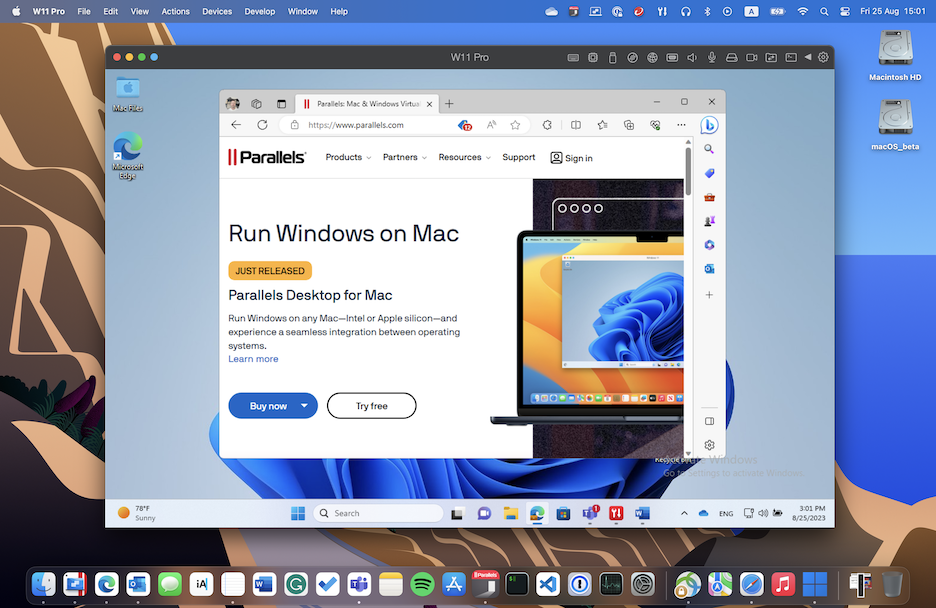
Windows とアプリケーションを、独立したウィンドウに一緒に表示するよう設定できます。
Windows 11 in a Single Window Mode
{% hint style="info" %}
**注**: Coherence モードは、Parallels Desktop の App Store エディションではサポートされていません。スタンダードエディションと App Store エディションの違いについては、こちらの[リンク](https://kb.parallels.com/123796)を参照してください。
{% endhint %}
Coherence モードからウィンドウモードに切り替えるには、次のいずれかを実行します。
* メニューバーの Parallels Desktop アイコンをクリックし、**\[表示]** > **\[Coherence の終了]** を選択します。
* Parallels Desktop メニューが Mac のメニューバーで使用できる場合は、**\[表示]** > **\[Coherence の終了]** をクリックします。
フルスクリーンモードからウィンドウモードに切り替えるには、次のいずれかを実行します。
* Command-Control-F を押します。
* macOS メニューバーが表示されるまで、画面上部にポインターを移動し、**\[表示]** > **\[ウィンドウモード]** をクリックします。ゲームに最適化されたフルスクリーンを使用している場合は、Control-Option(Alt)を押して Mac メニューバーを表示します。
---
# Agent Instructions
This documentation is published with GitBook. GitBook is the documentation platform designed so that both humans and AI agents can read, navigate, and reason over technical content effectively. Learn more at gitbook.com.
## Querying This Documentation
If you need additional information that is not directly available in this page, you can query the documentation dynamically by asking a question.
Perform an HTTP GET request on the current page URL with the `ask` query parameter, and the optional `goal` query parameter:
```
GET https://docs.parallels.com/landing/pdfm-ug/v27-ja-jp/parallels-desktop-for-mac-27-yzzugaido/mac-de-windows-wosuru/macos-deno-windows-nono/windows-wonowindounisuruyou.md?ask=&goal=
```
`ask` is the immediate question: it should be specific, self-contained, and written in natural language.
`goal` is optional and describes the broader end goal you are ultimately trying to accomplish on behalf of the user. GitBook uses it to tailor the answer towards what is most useful for that goal.
The response will contain a direct answer to the question and relevant excerpts and sources from the documentation.
Use this mechanism when the answer is not explicitly present in the current page, you need clarification or additional context, or you want to retrieve related documentation sections.