> For the complete documentation index, see [llms.txt](https://docs.parallels.com/landing/llms.txt). Markdown versions of documentation pages are available by appending `.md` to page URLs; this page is available as [Markdown](https://docs.parallels.com/landing/pdfm-ug/v27-ja-jp/parallels-desktop-for-mac-27-yzzugaido/mac-de-windows-wosuru/mimino-webcam-no.md).
# 組み込みの外部 Webcam の使用
Mac またはディスプレイにカメラが組み込まれている場合、または互換性のある外付け Webcam を接続すると、デフォルトでは Windows でもそれを使用できます。
{% hint style="info" %}
**注**:OBS Camera および BGRA カラーモデルは、Parallels Desktop for Mac バージョン 20.3.0 以降でサポートされています。
{% endhint %}
組み込みまたは外付けのカメラを Windows で使用するには、以下の操作を実行します。
* カメラを使用する Windows アプリケーションを開くと、プログラムで使用する iSight または外付けのカメラを選択できます。
{% hint style="info" %}
**注:** Windows 10/11 以外のゲスト OS を実行している場合は、USB ビデオデバイスクラス(UVC)ドライバーがインストールされていることを確認してください。
{% endhint %}
### **カメラの共有を無効にする**
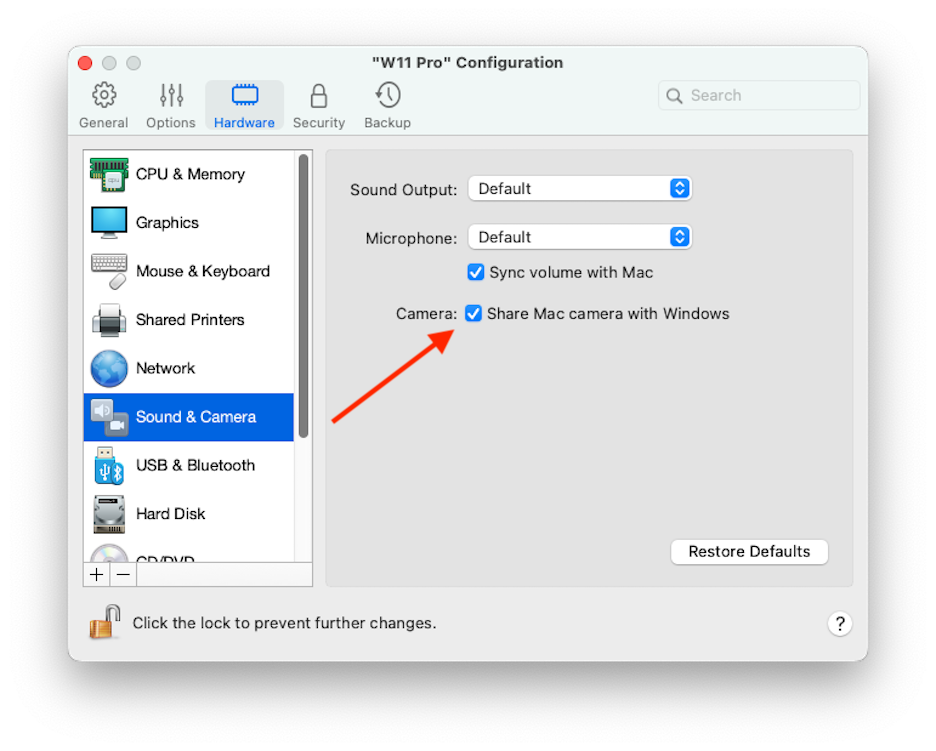
Windows アプリケーションが Webcam や組み込みのカメラに接続できないようにするには、次の操作を実行し、カメラの共有を無効にします。
1. コントロールセンターを開いて選択する仮想マシンを右クリックし、**\[構成]** を選択します。
2. **\[ハードウェア]** をクリックし、**\[サウンドとカメラ]** をクリックします。
3. **\[カメラ]** の選択を解除します。
---
# Agent Instructions
This documentation is published with GitBook. GitBook is the documentation platform designed so that both humans and AI agents can read, navigate, and reason over technical content effectively. Learn more at gitbook.com.
## Querying This Documentation
If you need additional information that is not directly available in this page, you can query the documentation dynamically by asking a question.
Perform an HTTP GET request on the current page URL with the `ask` query parameter, and the optional `goal` query parameter:
```
GET https://docs.parallels.com/landing/pdfm-ug/v27-ja-jp/parallels-desktop-for-mac-27-yzzugaido/mac-de-windows-wosuru/mimino-webcam-no.md?ask=&goal=
```
`ask` is the immediate question: it should be specific, self-contained, and written in natural language.
`goal` is optional and describes the broader end goal you are ultimately trying to accomplish on behalf of the user. GitBook uses it to tailor the answer towards what is most useful for that goal.
The response will contain a direct answer to the question and relevant excerpts and sources from the documentation.
Use this mechanism when the answer is not explicitly present in the current page, you need clarification or additional context, or you want to retrieve related documentation sections.