> For the complete documentation index, see [llms.txt](https://docs.parallels.com/landing/llms.txt). Markdown versions of documentation pages are available by appending `.md` to page URLs; this page is available as [Markdown](https://docs.parallels.com/landing/pdfm-ug/v27-ja-jp/parallels-desktop-for-mac-27-yzzugaido/na/mac-deno-os-wosuru/gesuto-os-toshiteno-macos-no.md).
# ゲスト OS としての macOS の使用
仮想マシンに macOS のコピーをインストールして、それをゲスト OS として使用できます。たとえば、メインアカウントにログイン/ログアウトせずに、macOS の別のバージョンでソフトウェアをテストしたい場合に便利です。
{% hint style="warning" %}
**注**: App Store版Parallels DesktopでmacOS仮想マシンを作成および実行するには、バージョン1.26.1以降へのアップデートが必要です。App Store Edition の詳細については、こちらの[リンク](https://kb.parallels.com/123796)を参照してください。
{% endhint %}
仮想マシンに macOS をインストールするには、以下の操作を実行します。
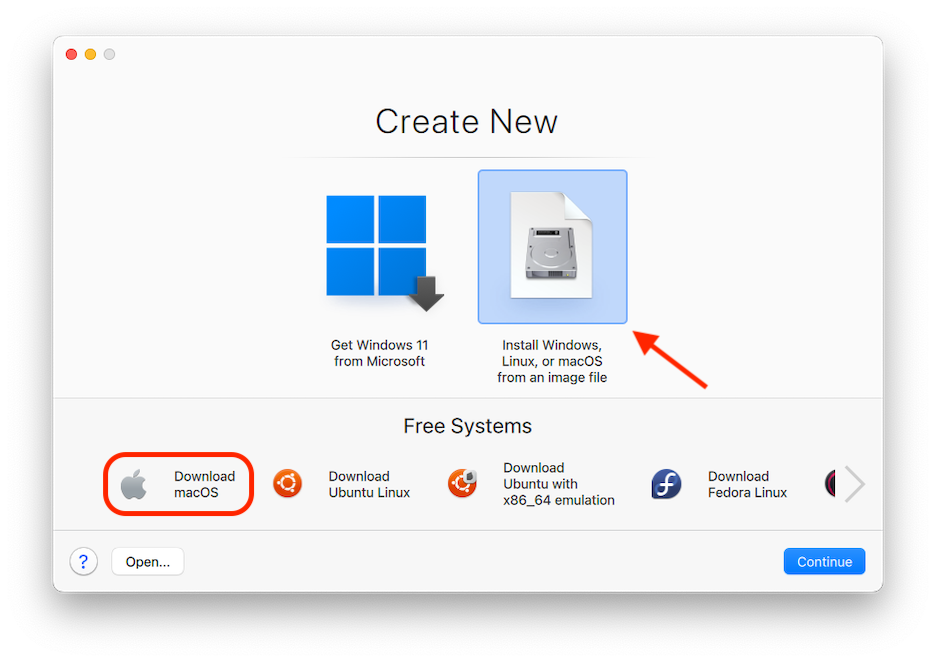
1. Parallels Desktop を開き、**\[ファイル]** > **\[新規]** を選択するか、**コントロールセンター**の右上隅にある **\[+]** ボタンを使用します。
2. Apple silicon Macの場合:**\[無料システム]** で **\[ダウンロード macOS]** を選択し、**\[続行]** をクリックして、画面の指示に従います。このプロセスは、あなたのMacのmacOSのバージョンに合わせてmacOSのバージョンをインストールします。
3. `.ipsw` ファイルを使用して別のバージョンの macOS をインストールしたい場合は、イメージファイルから **\[Windows、Linux、または macOS をイメージファイルからインストールします]**オプションを使用し、画面の指示に従います。このメソッドではドラッグアンドドロップもサポートされています。
{% hint style="info" %}
**注**: このオプションは、例えば macOS Sequoia 15 が動作している Mac 上に macOS Sonoma 14 仮想マシンをインストールするなど、お使いの Mac が動作しているバージョンとは異なるバージョンの macOS をインストールしたい場合に便利です。
例えば、macOS Sequoia 15 を実行している Mac 上で macOS Tahoe 26 仮想マシンを作成するには、まず Xcode をバージョン 26 にアップデートする必要があります。
{% endhint %}
macOS 仮想マシンにはいくつかの制限が残っており、そのうちのいくつかは CPU アーキテクチャに特有のものです。たとえば、[Coherence モード](/landing/pdfm-ug/v27-ja-jp/parallels-desktop-for-mac-27-yzzugaido/mac-de-windows-wosuru/macos-deno-windows-nono/windows-to-macos-nomji.md)は macOS 仮想マシンではサポートされていません。
{% hint style="danger" %}
**警告**: Apple 独自の仮想化フレームワークの制限により、Apple Account でのサインインや、バックアップ、同期、リモート管理のために macOS 仮想マシンを iCloud に接続すること(**\[システム設定]** -> **\[Apple ID]**)は、Apple silicon搭載のMacでmacOS Sonoma以前のバージョンを実行している場合はサポートされていません。
{% endhint %}
Apple Silicon Mac 上で動作する macOS 仮想マシンの最新の制限については、こちらの [KB 記事](https://kb.parallels.com/128867)を参照してください。
[ファンクションキーやその他のシステムショートカットにより、macOS のホストバージョンかゲストバージョンでアクションをトリガーするかどうかを設定](/landing/pdfm-ug/v27-ja-jp/parallels-desktop-for-mac-27-yzzugaido/mac-de-windows-wosuru/mausutorakkupaddokbdo/kbdoshtokattonokasutamaizu.md)することもできます。
---
# Agent Instructions
This documentation is published with GitBook. GitBook is the documentation platform designed so that both humans and AI agents can read, navigate, and reason over technical content effectively. Learn more at gitbook.com.
## Querying This Documentation
If you need additional information that is not directly available in this page, you can query the documentation dynamically by asking a question.
Perform an HTTP GET request on the following URL with the `ask` and `goal` query parameters:
```
GET https://docs.parallels.com/landing/pdfm-ug/v27-ja-jp/parallels-desktop-for-mac-27-yzzugaido/na/mac-deno-os-wosuru/gesuto-os-toshiteno-macos-no.md?ask=&goal=
```
`ask` is the immediate question: it should be specific, self-contained, and written in natural language.
`goal` is what the user is ultimately trying to achieve, the reason they need the answer. Sharing it helps GitBook give you a better, more relevant answer. A goal is most helpful when it describes the outcome the user wants rather than restating the question. For example, with `ask=how do I create an API token`, a goal like `build a script that syncs our docs to a CMS` lets GitBook tailor the answer to that use case.
The response will contain a direct answer to the question and relevant excerpts and sources from the documentation.
Use this mechanism when the answer is not explicitly present in the current page, you need clarification or additional context, or you want to retrieve related documentation sections.