> For the complete documentation index, see [llms.txt](https://docs.parallels.com/landing/llms.txt). Markdown versions of documentation pages are available by appending `.md` to page URLs; this page is available as [Markdown](https://docs.parallels.com/landing/pdfm-ug/v27-ja-jp/parallels-desktop-for-mac-27-yzzugaido/parallels-desktop-tomashin/mashin/hdowea/btono.md).

# ブート順序の設定

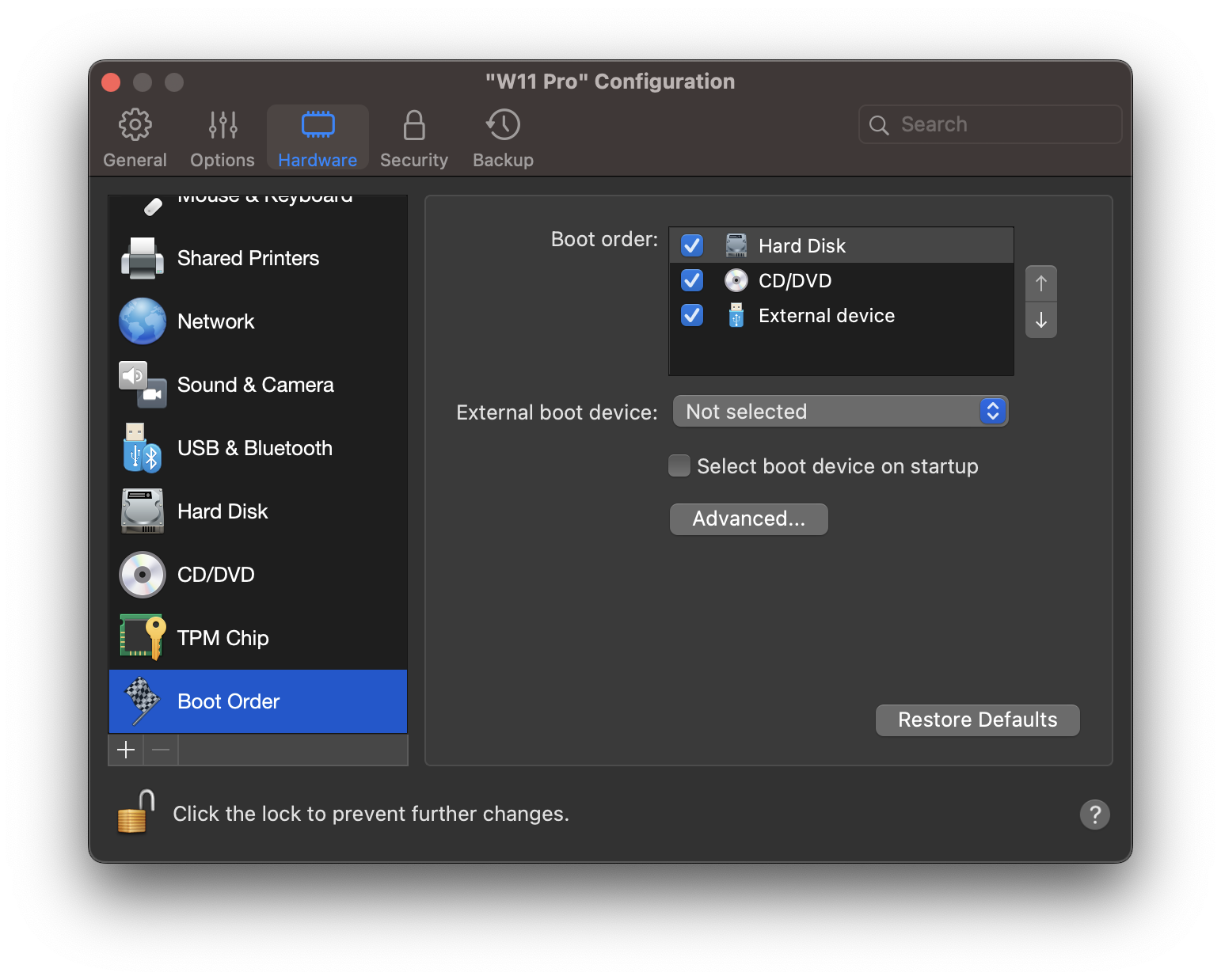
**\[ブート順序]** ペインで、仮想マシンのブートシーケンス、すなわち、仮想マシンがさまざまなブートデバイスから OS のロードを試みる順序を表示および構成できます。

これらの設定を開くには、**\[アクション]** > **\[構成]** > **\[ハードウェア]** を選択し、**\[ブート順序]** をクリックします。

<figure><img src="https://337036503-files.gitbook.io/~/files/v0/b/gitbook-x-prod.appspot.com/o/spaces%2FUmbH6Lp9Mv0rCplkFmMZ%2Fuploads%2Fgit-blob-f99c27e5529155f5ae230477588c819711f47d00%2FVM_boot_order.png?alt=media" alt="" width="563"><figcaption></figcaption></figure>

<table><thead><tr><th width="221">オプション</th><th>説明</th></tr></thead><tbody><tr><td><strong>ブート順序</strong></td><td><p>この一覧を使用して、ブート順序の設定を編集します。現在サポートされているブートデバイスは以下のとおりです。</p><ul><li><strong>ハードディスク</strong>: このデバイスは、仮想マシンをその仮想ハードディスク ドライブから起動させる場合に選択します。</li><li><strong>CD/DVD-ROM</strong>: このデバイスは、仮想マシンをその仮想 CD/DVD-ROM ドライブに接続されているメディアから起動させる場合に選択します。</li></ul><p><strong>注:</strong> 仮想マシンは、その構成で <strong>[CD/DVD-ROM]</strong> として指定されている CD/DVD-ROM ドライブを使用します。</p><ul><li><strong>外部デバイス</strong>。このデバイスは、Mac に接続された起動可能な外部デバイス（USB、FireWire、Thunderbolt など）から仮想マシンを起動させる場合に選択します。選択後、下の <strong>[外部ブートデバイス]</strong> メニューからデバイスを選択します。</li></ul><p>仮想マシンを開始するたびに、<strong>[ブート順序]</strong> の一覧で 1 番目のデバイスとして指定したデバイスから起動しようとします。仮想マシンが 1 番目のデバイスから起動できない（メディアが接続されていない場合など）場合、仮想マシンは一覧の 2 番目のデバイスに進み、そのデバイスからの起動を試みます。それ以降も同様です。</p><p>この一覧では、以下の操作を実行できます。</p><ul><li>対応するブートデバイスの名前を選択し、それを一覧の右側の矢印を使用して上下に移動することで、現在設定されているブートシーケンスを変更できます。</li><li>デバイス名の横のチェックボックスをオフにして、シーケンスからブートデバイスを削除できます。</li></ul></td></tr><tr><td><strong>外部ブートデバイス</strong></td><td><strong>[ブート順序]</strong> メニューから <strong>[外部デバイス]</strong> を選択した場合は、このメニューを使用して外部ブートデバイスを選択します。</td></tr><tr><td><strong>スタートアップ時のブートデバイスを選択</strong></td><td><p>このオプションを選択すると、仮想マシンのスタートアップ時に、メッセージ"<code>Press ESC to select boot device</code>" が表示されます。ESC キーを 5 秒間押し続けると、ブート デバイスを選択できます。ESC キーを押さない場合には、仮想マシンは <strong>[ブート順序]</strong> の一覧で指定されたデバイスからのブートを試みます。<br></p><p><strong>注:</strong> 仮想マシンのブートに使用するデバイス（ハードディスクドライブ、CD/DVD-ROMドライブ、または外部デバイス）が仮想マシンで使用可能で、正しく構成されていることを確認してください。仮想マシンにブートデバイスが構成されていない場合には、仮想マシンの起動後に“<code>No boot device is available...</code>" というエラーメッセージが表示されます。この場合、仮想マシンを停止し、最低 1 つのブートデバイスを構成してください。</p></td></tr><tr><td><strong>ブートフラグ</strong></td><td><strong>[ブートフラグ]</strong> フィールドは、仮想マシンシステムの動作を変更する可能性があるフラグを指定するためのものです。システム フラグは、お使いの仮想マシンで何らかの不具合が発生した場合に、Parallels お客様サポートチームによって使用されます。お客様サポートスタッフの指示がない限り、このフィールドには何も入力しないでください。</td></tr></tbody></table>


---

# Agent Instructions
This documentation is published with GitBook. GitBook is the documentation platform designed so that both humans and AI agents can read, navigate, and reason over technical content effectively. Learn more at gitbook.com.

## Querying This Documentation
If you need additional information that is not directly available in this page, you can query the documentation dynamically by asking a question.

Perform an HTTP GET request on the current page URL with the `ask` query parameter, and the optional `goal` query parameter:

```
GET https://docs.parallels.com/landing/pdfm-ug/v27-ja-jp/parallels-desktop-for-mac-27-yzzugaido/parallels-desktop-tomashin/mashin/hdowea/btono.md?ask=<question>&goal=<endgoal>
```

`ask` is the immediate question: it should be specific, self-contained, and written in natural language.
`goal` is optional and describes the broader end goal you are ultimately trying to accomplish on behalf of the user. GitBook uses it to tailor the answer towards what is most useful for that goal.

The response will contain a direct answer to the question and relevant excerpts and sources from the documentation.

Use this mechanism when the answer is not explicitly present in the current page, you need clarification or additional context, or you want to retrieve related documentation sections.
