> For the complete documentation index, see [llms.txt](https://docs.parallels.com/landing/llms.txt). Markdown versions of documentation pages are available by appending `.md` to page URLs; this page is available as [Markdown](https://docs.parallels.com/landing/pdfm-ug/v27-ja-jp/parallels-desktop-for-mac-27-yzzugaido/parallels-desktop-tomashin/mashin/opushon/tono.md).

# 起動と終了の設定

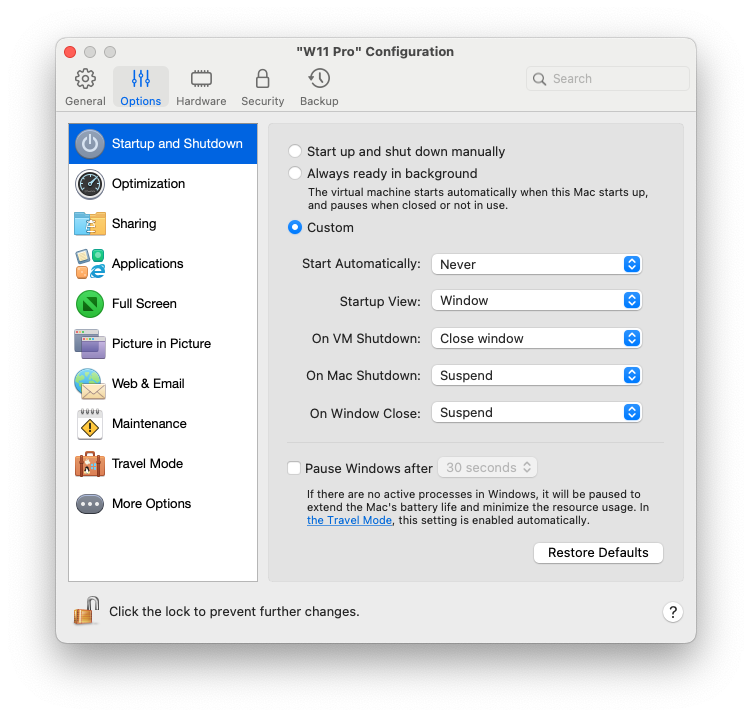
**\[起動と終了]** ペインでは、仮想マシンの起動と終了の方法を構成できます。

この設定を開くには、**\[アクション]** > **\[構成]** > **\[オプション]** を選択し、**\[起動と終了]** をクリックします。

<figure><img src="https://content.gitbook.com/content/UmbH6Lp9Mv0rCplkFmMZ/blobs/SMcEClrOdx0OC88xZorS/Screenshot%202024-01-19%20at%2016.30.00.png" alt="" width="563"><figcaption></figcaption></figure>

| オプション                    | 説明                                                                                                                                                                                                                                                                                                                                                                                                                                                                                                                                                                                                                                                                                                                                                                                                                                                                                                                                                                                                                                                                                                                                                                                                                                                                                                                                                                                                                                                                                            |
| ------------------------ | --------------------------------------------------------------------------------------------------------------------------------------------------------------------------------------------------------------------------------------------------------------------------------------------------------------------------------------------------------------------------------------------------------------------------------------------------------------------------------------------------------------------------------------------------------------------------------------------------------------------------------------------------------------------------------------------------------------------------------------------------------------------------------------------------------------------------------------------------------------------------------------------------------------------------------------------------------------------------------------------------------------------------------------------------------------------------------------------------------------------------------------------------------------------------------------------------------------------------------------------------------------------------------------------------------------------------------------------------------------------------------------------------------------------------------------------------------------------------------------------- |
| **マニュアル起動とシャットダウン**      | 仮想マシンを常に手動で起動、終了する場合に、このオプションを選択します。                                                                                                                                                                                                                                                                                                                                                                                                                                                                                                                                                                                                                                                                                                                                                                                                                                                                                                                                                                                                                                                                                                                                                                                                                                                                                                                                                                                                                                                          |
| **常にバックグラウンドで待機**        | Mac が起動するとき、自動的に仮想マシンを起動させたい場合は、このオプションを選択します。                                                                                                                                                                                                                                                                                                                                                                                                                                                                                                                                                                                                                                                                                                                                                                                                                                                                                                                                                                                                                                                                                                                                                                                                                                                                                                                                                                                                                                                |
| **カスタム**                 | <p>仮想マシンの起動、終了方法のみでなく、表示モードと、仮想マシンウィンドウを閉じるときの動作を指定する場合は、<strong>\[カスタム]</strong> を選択し、次を指定します。</p><ul><li><p><strong>自動的にスタート</strong>: 仮想マシンを自動的に起動させるかどうかを設定する場合に、このメニューを使用します。</p><ul><li><strong>使用しない</strong>: 仮想マシンを自動的に起動しません。</li><li><strong>ウィンドウを開いたとき</strong>: <strong>コントロールセンター</strong>から仮想マシンを開いたときに、仮想マシンを自動的に起動します。</li><li><strong>Parallels Desktop を起動したとき</strong>: Parallels Desktop を起動したとき、仮想マシンが自動的に起動します。</li><li><strong>Mac の起動時。</strong>Mac を起動したときに、仮想マシンが自動的に起動します。このオプションを選択すると、仮想マシンの起動を遅らせるように構成することもできます。</li><li><strong>ユーザーがログインするとき</strong>。macOS ユーザーが Mac のスタートアップで macOS にログインすると、Windows は自動的に起動します。</li></ul></li><li><strong>スタートアップ表示</strong>: このメニューを使用すると、仮想マシンまたはゲスト OS アプリケーションを開始したときに仮想マシンをどの表示モードで起動するかを選択できます。</li><li><p><strong>VM のシャットダウン時</strong>: 仮想マシンの終了時の動作を設定する場合に、このメニューを使用します。</p><ul><li><strong>ウィンドウを開いたままにする</strong>: 仮想マシンが別のウィンドウに表示されるよう設定されている場合は、仮想マシンを停止またはシャットダウンしても、ウィンドウは開いたままになります。</li><li><strong>ウィンドウを閉じる</strong>: 仮想マシンが別のウィンドウに表示されるよう設定されている場合は、仮想マシンを停止またはシャットダウンすると、ウィンドウは閉じられます。</li><li><strong>Parallels Desktop を終了する</strong>: 仮想マシンを停止またはシャットダウンすると、Parallels Desktop も終了します。</li></ul></li><li><strong>Mac のシャットダウン時</strong>。このメニューを使用して、Mac をシャットダウンしたときの動作を指定します（Parallels Desktop for Mac Pro と Business Editions のみ）。</li><li><strong>ウィンドウを閉じたとき</strong>: Parallels Desktop ウィンドウを閉じたときの動作を設定する場合に、このメニューを使用します。これらの設定は、仮想マシンが別のウィンドウに表示されるよう設定されている場合の動作にのみ影響します。</li></ul> |
| **指定時間後に Windows を一時停止** | <p>Windows にアクティブなプロセスがない場合でも、Mac の CPU リソースを消費します。このオプションを選択して、非アクティブな時間を指定すると、その時間の経過後に Windows が自動的に一時停止されます。そうすることで、Windows のサービスによって使用される CPU リソースが減少し、バッテリーを節約して環境を保護することができます。<br><br><strong>注</strong>：このオプションは、新しく作成された仮想マシンではデフォルトで無効になっています。</p>                                                                                                                                                                                                                                                                                                                                                                                                                                                                                                                                                                                                                                                                                                                                                                                                                                                                                                                                                                                                                                                                                                                                                                                                                                  |


---

# Agent Instructions
This documentation is published with GitBook. GitBook is the documentation platform designed so that both humans and AI agents can read, navigate, and reason over technical content effectively. Learn more at gitbook.com.

## Querying This Documentation
If you need additional information that is not directly available in this page, you can query the documentation dynamically by asking a question.

Perform an HTTP GET request on the current page URL with the `ask` query parameter, and the optional `goal` query parameter:

```
GET https://docs.parallels.com/landing/pdfm-ug/v27-ja-jp/parallels-desktop-for-mac-27-yzzugaido/parallels-desktop-tomashin/mashin/opushon/tono.md?ask=<question>&goal=<endgoal>
```

`ask` is the immediate question: it should be specific, self-contained, and written in natural language.
`goal` is optional and describes the broader end goal you are ultimately trying to accomplish on behalf of the user. GitBook uses it to tailor the answer towards what is most useful for that goal.

The response will contain a direct answer to the question and relevant excerpts and sources from the documentation.

Use this mechanism when the answer is not explicitly present in the current page, you need clarification or additional context, or you want to retrieve related documentation sections.