> For the complete documentation index, see [llms.txt](https://docs.parallels.com/landing/llms.txt). Markdown versions of documentation pages are available by appending `.md` to page URLs; this page is available as [Markdown](https://docs.parallels.com/landing/pdfm-ug/v27-ja-jp/parallels-desktop-for-mac-27-yzzugaido/parallels-desktop-tomashin/parallels-desktop-huan-jing-she-ding/na-1.md).

# 詳細な環境設定

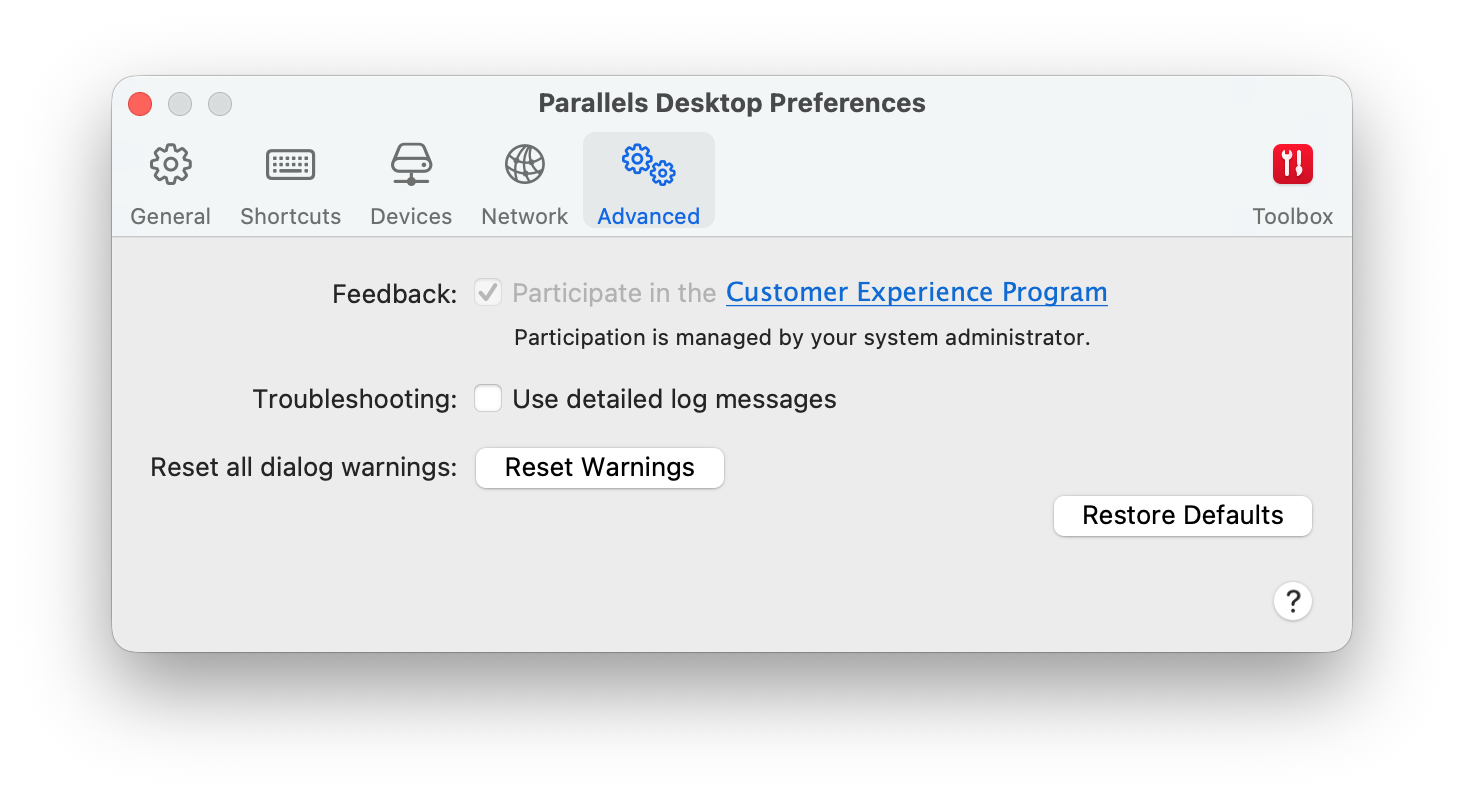
**\[詳細]** 環境設定を使用して、カスタマエクスペリエンスプログラムへの参加、非表示メッセージの再表示、および Parallels Desktop のより詳細なログファイルの作成が可能です。

これらの環境設定を開くには、**\[Parallels Desktop]** > **\[環境設定]** を選択し、**\[詳細]** をクリックします。

<figure><img src="https://337036503-files.gitbook.io/~/files/v0/b/gitbook-x-prod.appspot.com/o/spaces%2FUmbH6Lp9Mv0rCplkFmMZ%2Fuploads%2Fgit-blob-931f62691bc5152313abcdc704b07faa957e8bac%2FPDFM-122038_PDPref-Advanced.png?alt=media" alt="" width="561"><figcaption></figcaption></figure>

<table><thead><tr><th width="281">オプション</th><th>オプション</th></tr></thead><tbody><tr><td><strong>フィードバック</strong></td><td><p>お客様のニーズにより適するように、Parallels Desktop の改善にご協力いただける場合は、<strong>[カスタマーエクスペリエンスプログラムに参加する]</strong> を選択してください。Parallels はご使用の Mac と仮想マシンの構成に関する情報を収集します。<br></p><p><strong>注:</strong> 名前、電子メール、住所、電話番号などの個人情報、およびキーボード入力は<em>収集されません</em>。</p></td></tr><tr><td><strong>トラブルシューティング</strong></td><td>Parallels Desktop はその動作中に、ログファイルを自動的に作成します。Parallels サポートチームは、このファイルを活用して問題の解決や製品の改善にあたります。<strong>[詳細ログメッセージを使用する]</strong> オプションを選択すると、Parallels Desktop はより詳細なログファイルの作成を開始します。これは Parallels サポートチームにとっては有益なファイルとなりますが、ハードディスク領域の使用量が増加するだけでなく、システムのパフォーマンスが低下する可能性があります。Parallels サポートチームから依頼があるまで、このオプションを有効にすることはお勧めしません。</td></tr><tr><td><strong>すべてのダイアログ警告をリセット</strong></td><td>Parallels Desktop の一部のダイアログボックスやウィンドウには、<strong>[今後、このメッセージを表示しない]</strong> オプションが表示されます。このオプションを選択すると、次に同じ操作を実行した場合にこのダイアログボックスが表示されなくなります。<strong>[警告をリセット]</strong> ボタンを使用して、このオプションが選択されているすべてのダイアログボックスやウィンドウをリセットすると、その操作を開始するたびに再びメッセージが表示されるようになります。</td></tr></tbody></table>


---

# Agent Instructions
This documentation is published with GitBook. GitBook is the documentation platform designed so that both humans and AI agents can read, navigate, and reason over technical content effectively. Learn more at gitbook.com.

## Querying This Documentation
If you need additional information that is not directly available in this page, you can query the documentation dynamically by asking a question.

Perform an HTTP GET request on the current page URL with the `ask` query parameter, and the optional `goal` query parameter:

```
GET https://docs.parallels.com/landing/pdfm-ug/v27-ja-jp/parallels-desktop-for-mac-27-yzzugaido/parallels-desktop-tomashin/parallels-desktop-huan-jing-she-ding/na-1.md?ask=<question>&goal=<endgoal>
```

`ask` is the immediate question: it should be specific, self-contained, and written in natural language.
`goal` is optional and describes the broader end goal you are ultimately trying to accomplish on behalf of the user. GitBook uses it to tailor the answer towards what is most useful for that goal.

The response will contain a direct answer to the question and relevant excerpts and sources from the documentation.

Use this mechanism when the answer is not explicitly present in the current page, you need clarification or additional context, or you want to retrieve related documentation sections.
