# Introduction
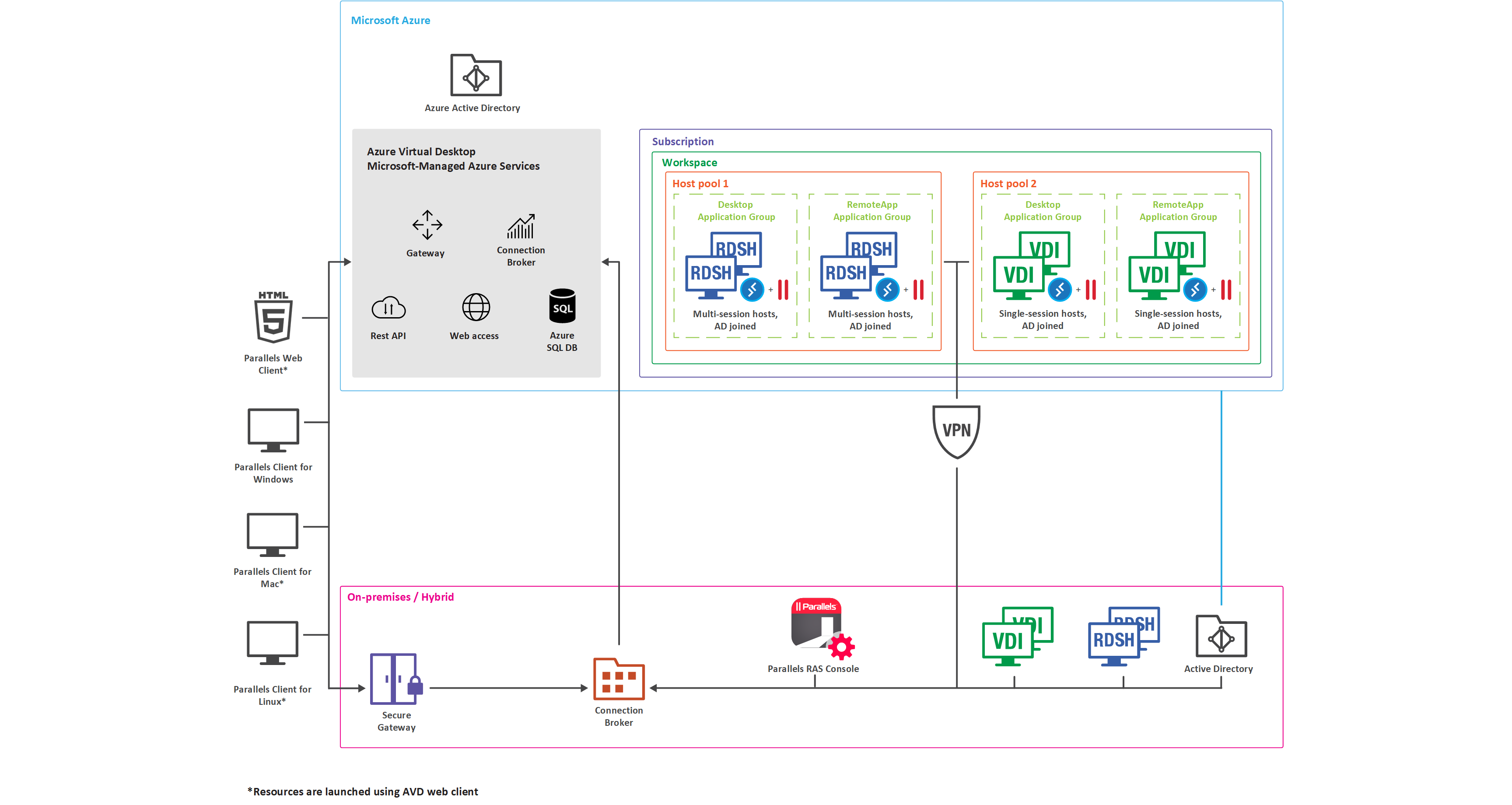
The diagram below illustrates a hybrid deployment of Parallels RAS and Azure Virtual Desktop with the following characteristics:
* Workload hosts are available both on-premises through standard Parallels RAS deployment and on Microsoft Azure through the service.
* Azure Virtual Desktop objects such as workspaces, host pools, desktop and RemoteApp groups are created and configured from the Parallels RAS Console.
* Azure Virtual Desktop hosts (multi-session or single-session) contain both Azure Virtual Desktop Agent and RAS Agent for management and configuration purposes.
* Parallels Client for Windows is connecting to both Parallels RAS Secure Gateway and Azure Virtual Desktop service providing resource availability to end-users from a single interface.
## **Extended values and capabilities**
* Simplify and enhance Azure Virtual Desktop deployment and management.
* Unify administration and user experience – single pane of glass – Parallels Clients and Parallels RAS Console.
* Extend reach with flexibility to use hybrid and multi-cloud deployments.
* Automate and streamline administrative routines, provisioning, and management of Azure Virtual Desktop workloads.
* Built in Auto-scale capability on Microsoft Azure and/or on-premises.
* Management of users, sessions, and processes.
* Utilize RAS Universal Printing and Scanning.
* Utilize AI based session prelaunch for ultra-fast logons.
* Accelerated file redirection with the use of enable drive cache redirection.
* Integrated automatic image optimizations and FSLogix Profile Containers.
* Client management.
* Security policies for clients.
* Leverage RAS Reporting and Monitoring from the RAS Console.
---
# Agent Instructions: Querying This Documentation
If you need additional information that is not directly available in this page, you can query the documentation dynamically by asking a question.
Perform an HTTP GET request on the current page URL with the `ask` query parameter:
```
GET https://docs.parallels.com/landing/ras-admin-guide/parallels-ras-21-administrators-guide/azure-virtual-desktop/introduction.md?ask=
```
The question should be specific, self-contained, and written in natural language.
The response will contain a direct answer to the question and relevant excerpts and sources from the documentation.
Use this mechanism when the answer is not explicitly present in the current page, you need clarification or additional context, or you want to retrieve related documentation sections.