# Using RADIUS
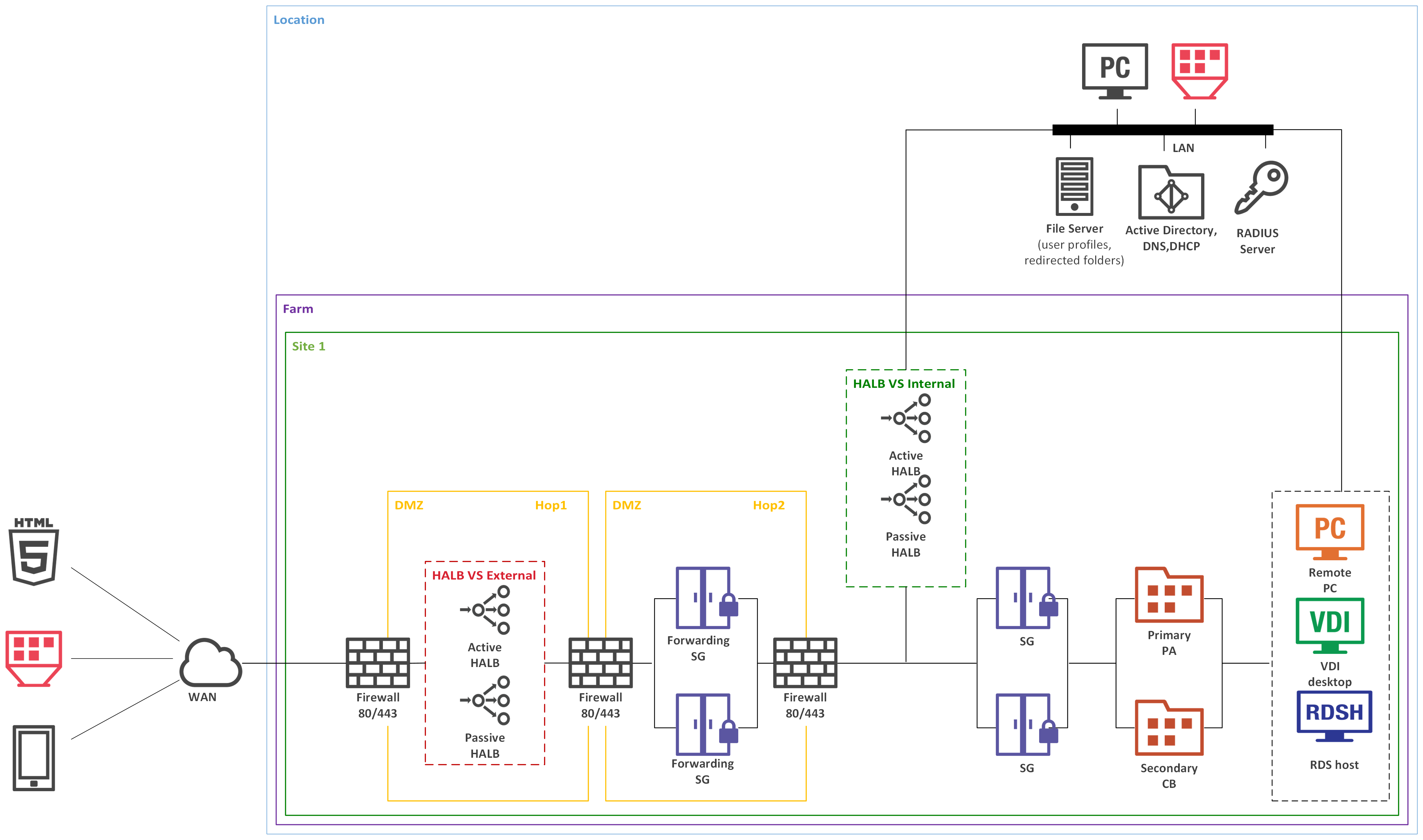
The below diagram shows the double hop perimeter network scenario with RAS Connection Broker connected to a RADIUS server (RADIUS is located in Intranet but it can be placed in DMZ).
To configure RADIUS properties:
1. In the Parallels RAS Console, navigate to **Connection > Multi-factor authentication**.
2. Double-click the MFA provider that you want to configure.
Read on to learn how to configure RADIUS provider settings.
---
# Agent Instructions: Querying This Documentation
If you need additional information that is not directly available in this page, you can query the documentation dynamically by asking a question.
Perform an HTTP GET request on the current page URL with the `ask` query parameter:
```
GET https://docs.parallels.com/landing/ras-admin-guide/v19-en-us/parallels-ras-19-administrators-guide/connection-and-authentication-settings/multi-factor-authentication/using-radius.md?ask=
```
The question should be specific, self-contained, and written in natural language.
The response will contain a direct answer to the question and relevant excerpts and sources from the documentation.
Use this mechanism when the answer is not explicitly present in the current page, you need clarification or additional context, or you want to retrieve related documentation sections.