# Cloud Cache
Cloud Cache is a technology that allows FSLogix Profile Container data to be stored in multiple locations at once, including traditional on-premises SMB shares and public cloud storage providers, and to enable real time, 'active-active' redundancy for Profile Container. Cloud Cache also uses a local cache of the profile disk to service all reads from a redirected profile after the first read. Cloud Cache can protect users from short-term loss of connectivity to remote profile containers. When using Cloud Cache, CCDLocations replaces VHDLocations. CCDLocations and VHDLocations cannot be used at the same time. Note that storing profiles in multiple locations at once generates more Azure consumption. Azure Blob storage specifically can be expensive in certain use cases. In general, always use the [Azure calculator](https://azure.microsoft.com/en-us/pricing/calculator/) to calculate Azure consumption costs up front.
**Pros:**
* Seamless failover should the loss of a single storage location occur.
* Real-time, active-active redundancy for Profile Container .
* Native cloud storage such as Azure Blob, can be utilized.
* Useful if you have latency issues between the location of storage and location of workloads.
**Cons:**
* Logon and logoff delays that impact the user experience. This delay is variable based on many factors such as the location of the container in relation to the location of workloads.
* A less mature solution.
* I/O capabilities must be considered as it affects user experience. See best practices for Cloud Cache below.
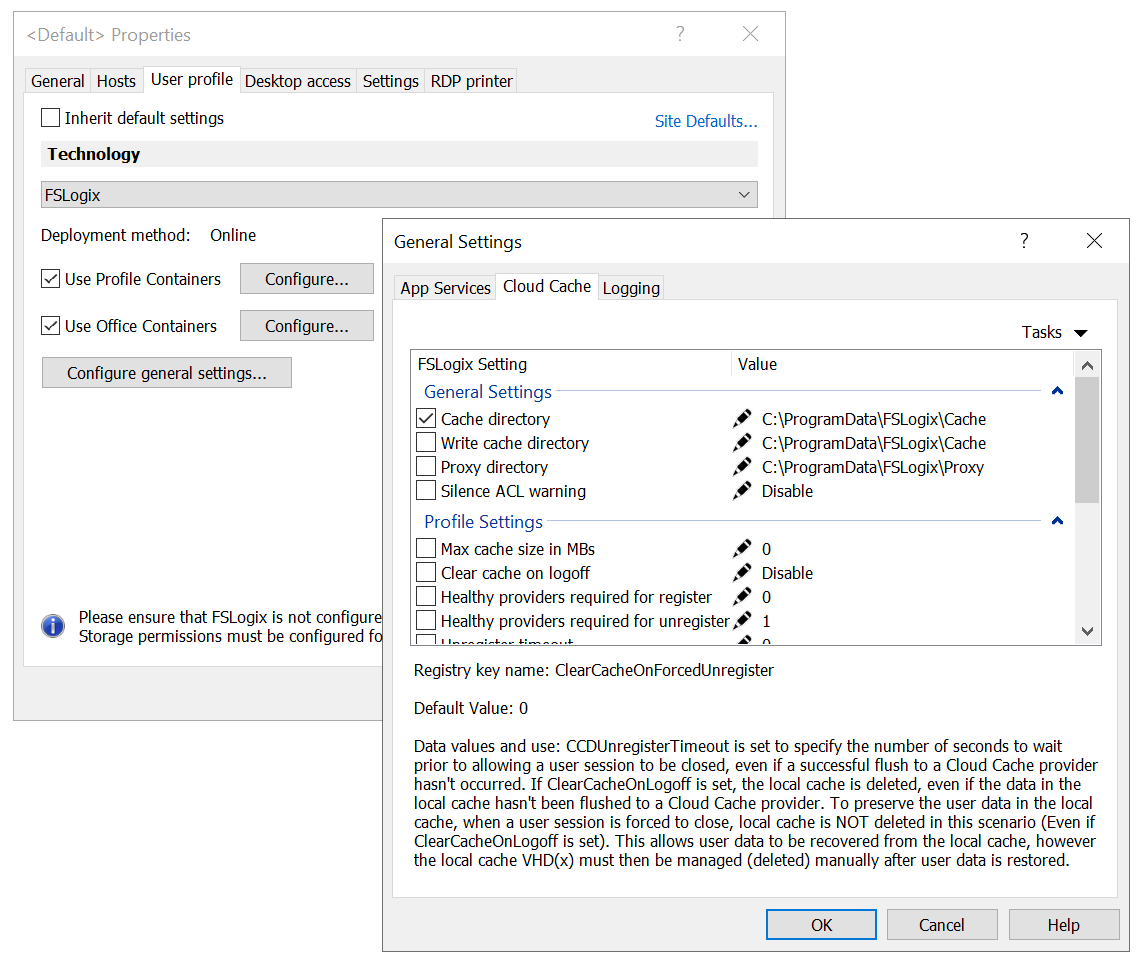
Parallels RAS allows you to configure Cloud Cache from within Parallels RAS Console.
To configure Cloud Cache:
1. Open the **User profile** tab.
2. Click **Configure general settings** and select the **Cloud Cache** tab.
From here you can configure all advanced settings related to Cloud Cache.
---
# Agent Instructions: Querying This Documentation
If you need additional information that is not directly available in this page, you can query the documentation dynamically by asking a question.
Perform an HTTP GET request on the current page URL with the `ask` query parameter:
```
GET https://docs.parallels.com/landing/ras-fslogix-containers-best-practices/configuring-fslogix-via-parallels-ras/best-practices/cloud-cache.md?ask=
```
The question should be specific, self-contained, and written in natural language.
The response will contain a direct answer to the question and relevant excerpts and sources from the documentation.
Use this mechanism when the answer is not explicitly present in the current page, you need clarification or additional context, or you want to retrieve related documentation sections.