> For the complete documentation index, see [llms.txt](https://docs.parallels.com/landing/llms.txt). Markdown versions of documentation pages are available by appending `.md` to page URLs; this page is available as [Markdown](https://docs.parallels.com/landing/ras-fslogix-containers-best-practices/configuring-fslogix-via-parallels-ras/fslogix-containers-backup/cloud-cache.md).
# Cloud Cache
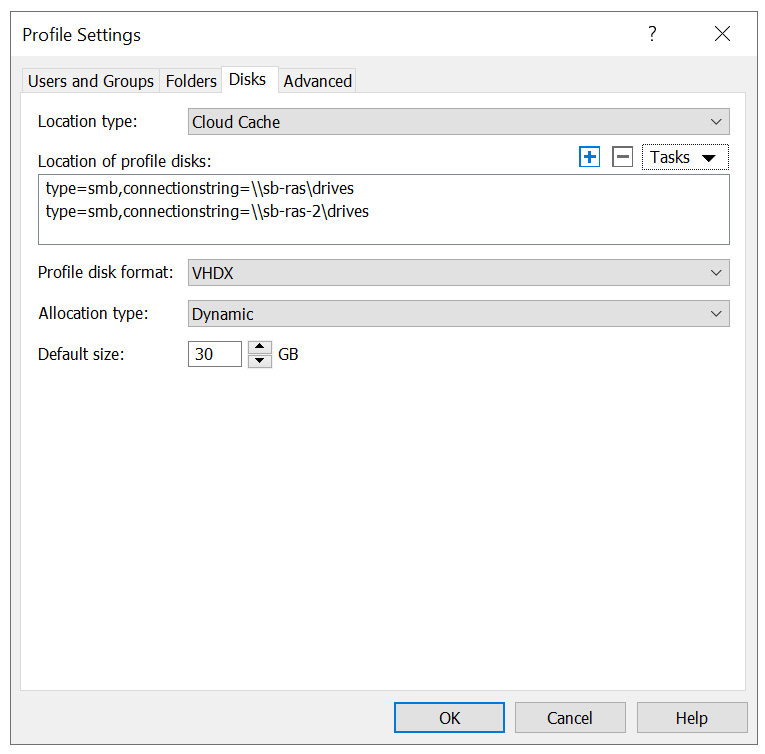
Cloud Cache technology allows storing multiple copies (per Microsoft, the practical limit is 4) of Profile Containers on SMB file shares and keeping its data in sync without the need to deploy complex replication infrastructure. Note though that logon and logoff delays may impact the user experience.
Examples of usage:
* Keeping copies of profiles in several storage locations (disaster recovery data center).
* Replicating data to the more cost-effective storage.
* Migrating from one storage location to another.
To configure multiple Cloud Cache locations (corresponds to CCDLocations setting), simply add them using the **\[+]** button on the **User Profile** tab.
Profile Container will read data from a provider if the data needed does not already exist in the Local Cache file. When configuring Cloud Cache locations, the order Providers are listed defines the order Profile Container uses them for reading. If the first path specified is unavailable, then Profile Container will attempt to read from the second Provider and so on.
Cloud Cache will always write to all Providers specified in CCDLocations, unless a specified Provider isn't available.
Because the Local Cache file will service most I/O requests, the performance of the Local Cache file will define the user experience. It is critical that the storage used for the Local Cache file is high-performing and highly available. It is also suggested that any storage used for the local cache file should be a physically attached storage or have reliability and performance characteristics that meet or exceed high-performing physically attached storage. When using Cloud Cache, FSLogix profiles can be stored on Azure Files as well as directly on Azure Page Blobs. For Azure Page Blobs, it is important to secure sensitive Azure credentials by using Credential Manager. This is explained in Chapter 3.
---
# Agent Instructions
This documentation is published with GitBook. GitBook is the documentation platform designed so that both humans and AI agents can read, navigate, and reason over technical content effectively. Learn more at gitbook.com.
## Querying This Documentation
If you need additional information that is not directly available in this page, you can query the documentation dynamically by asking a question.
Perform an HTTP GET request on the current page URL with the `ask` query parameter, and the optional `goal` query parameter:
```
GET https://docs.parallels.com/landing/ras-fslogix-containers-best-practices/configuring-fslogix-via-parallels-ras/fslogix-containers-backup/cloud-cache.md?ask=&goal=
```
`ask` is the immediate question: it should be specific, self-contained, and written in natural language.
`goal` is optional and describes the broader end goal you are ultimately trying to accomplish on behalf of the user. GitBook uses it to tailor the answer towards what is most useful for that goal.
The response will contain a direct answer to the question and relevant excerpts and sources from the documentation.
Use this mechanism when the answer is not explicitly present in the current page, you need clarification or additional context, or you want to retrieve related documentation sections.