> For the complete documentation index, see [llms.txt](https://docs.parallels.com/landing/llms.txt). Markdown versions of documentation pages are available by appending `.md` to page URLs; this page is available as [Markdown](https://docs.parallels.com/landing/ras-reference-architecture/deployment-scenarios/parallels-ras-deployment-scenarios/mixed-scenarios/multi-site-scenario.md).
# Multi-Site Scenario
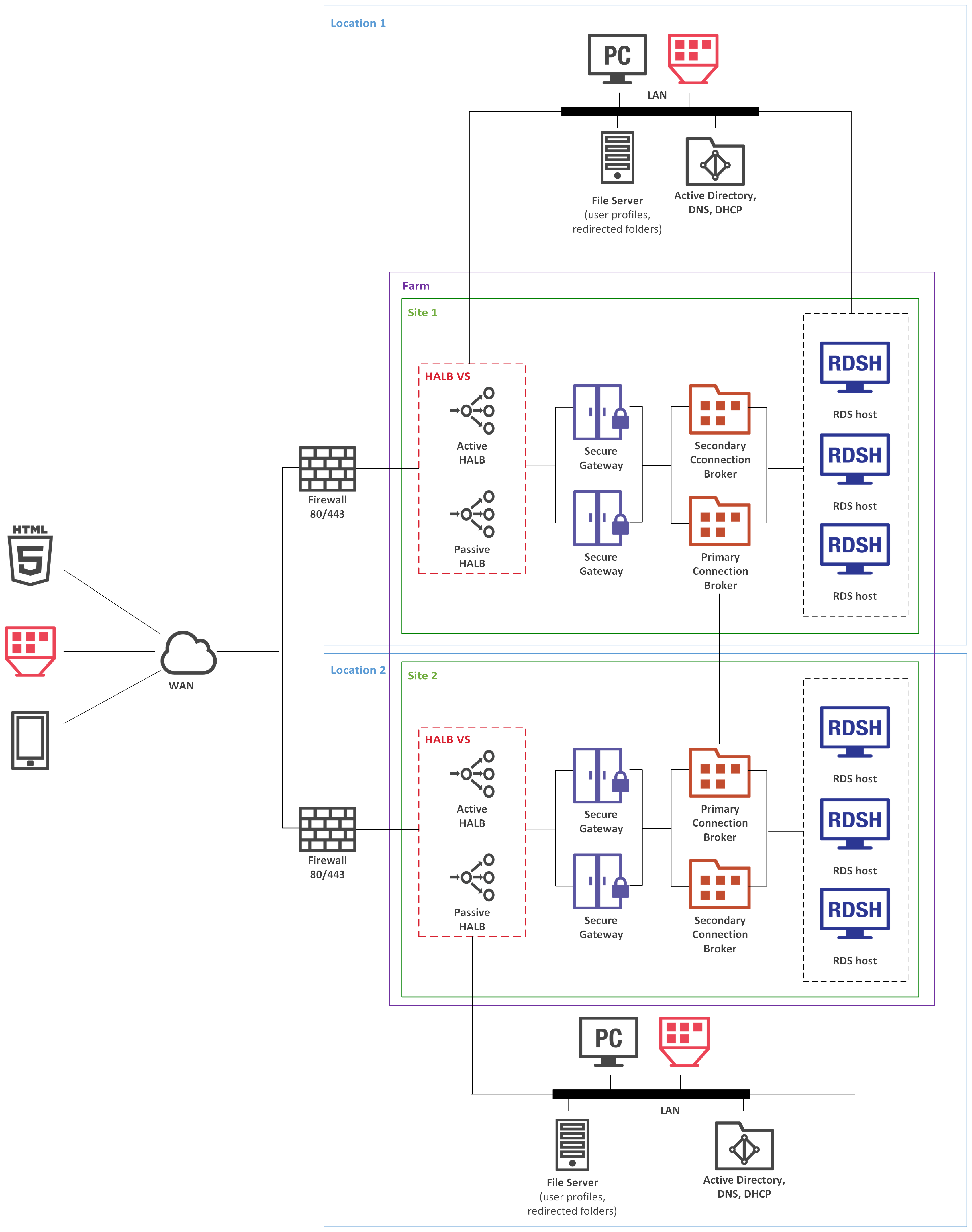
This scenario is suited for environments where published resources are distributed between two or more physical locations. Different administrators can administer a Parallels RAS farm containing multiple sites.
Each site consists of at least a RAS Connection Broker, RAS Secure Gateway (or multiple Secure Gateways), and agents installed on RD Session Host or VDI servers, or Windows PCs.
{% hint style="info" %}
**Note:** To add high availability for HALB, a second appliance can be deployed in each site.
{% endhint %}
If the resource set is similar, end users can use both sites via a single RAS connection. The following settings should be used as RAS connection properties in Parallels Client:
## **LAN users of Site1**
* Primary connection: local Primary Secure Gateway.
* Secondary connections:
* Local Secondary Secure Gateway.
* HALB VS IP address of Site2.
## **LAN users of Site2**
* Primary connection – local Primary Secure Gateway
* Secondary connections:
* Local Secondary Secure Gateway
* HALB VS IP address of Site1
## **WAN users**
* Primary connection - HALB VS IP address of Site1
* Secondary connections - HALB VS IP address of Site2
RAS connection settings can be configured either centrally (via Client Policy in the Parallels RAS Console) or manually.
## **Installation Notes**
RAS Connection Broker is installed using the Parallels RAS installer (standard installation).
HALB is installed as a ready-to-use virtual appliance and configured in HALB VS properties.
All other components are push-installed from the RAS console.
---
# Agent Instructions
This documentation is published with GitBook. GitBook is the documentation platform designed so that both humans and AI agents can read, navigate, and reason over technical content effectively. Learn more at gitbook.com.
## Querying This Documentation
If you need additional information that is not directly available in this page, you can query the documentation dynamically by asking a question.
Perform an HTTP GET request on the current page URL with the `ask` query parameter, and the optional `goal` query parameter:
```
GET https://docs.parallels.com/landing/ras-reference-architecture/deployment-scenarios/parallels-ras-deployment-scenarios/mixed-scenarios/multi-site-scenario.md?ask=&goal=
```
`ask` is the immediate question: it should be specific, self-contained, and written in natural language.
`goal` is optional and describes the broader end goal you are ultimately trying to accomplish on behalf of the user. GitBook uses it to tailor the answer towards what is most useful for that goal.
The response will contain a direct answer to the question and relevant excerpts and sources from the documentation.
Use this mechanism when the answer is not explicitly present in the current page, you need clarification or additional context, or you want to retrieve related documentation sections.