# Understanding Deployment Scenario Diagrams

## **Terms and Abbreviations**

Deployment scenario diagrams include terms and abbreviations, which are explained in the following table.

| **CB**                                                                   | RAS Connection Broker                                                                                                                             |
| ------------------------------------------------------------------------ | ------------------------------------------------------------------------------------------------------------------------------------------------- |
| **SG**                                                                   | RAS Secure Gateway (including User Portal)                                                                                                        |
| **Private SG**                                                           | Private RAS Secure Gateway (used for direct client connections)                                                                                   |
| <p><strong>RDSH, RDS host</strong></p><p><strong>RDSH Agent</strong></p> | <p>RD Session Host (formerly Terminal Server)</p><p>RAS RD Session Host Agent installed on an RD Session Host.</p>                                |
| **Remote PC**                                                            | A remote Windows computer with RAS Remote PC Agent installed                                                                                      |
| **VDI**                                                                  | Virtual Desktop Infrastructure (a VDI host with a hypervisor running virtual machines). Each virtual machine must have RAS Guest Agent installed. |
| **HALB**                                                                 | High Availability Load Balancing. An appliance that provides load balancing for RAS Secure Gateways.                                              |
| **Converted PC**                                                         | A PC with Windows converted to a thin-client-like OS.                                                                                             |
| **Enrollment Server**                                                    | RAS Enrollment Server (an essential part of SAML SSO Authentication functionality).                                                               |

## **Icons**

The following table describes the icons used in deployment scenario diagrams.

|                                                                                                                                                                                                                    |                                                                                                                                                   |
| ------------------------------------------------------------------------------------------------------------------------------------------------------------------------------------------------------------------ | ------------------------------------------------------------------------------------------------------------------------------------------------- |
| **Parallels RAS Server Components**                                                                                                                                                                                |                                                                                                                                                   |
| <img src="https://content.gitbook.com/content/jRndoUJVjRrmCN0WR7H6/blobs/H7E6OsxLVr65klKEqpsf/_solutions_guide_icon_rds.png" alt="_Solutions_Guide_icon_RDS.png" data-size="original">                             | A server hosting RAS Connection Broker. May also host other Parallels RAS components depending on a deployment.                                   |
| <img src="https://content.gitbook.com/content/jRndoUJVjRrmCN0WR7H6/blobs/LdSRBrcqu5h1xvnogncc/_solutions_guide_icon_gw_gateway.png" alt="_Solutions_Guide_icon_GW_Gateway.png" data-size="original">               | RAS Secure Gateway (including User Portal) used for secure (SSL) client connections.                                                              |
| <img src="https://content.gitbook.com/content/jRndoUJVjRrmCN0WR7H6/blobs/PIENZRf2jFoggIleGfAp/_solutions_guide_icon_gw_direct.png" alt="_Solutions_Guide_icon_GW_Direct.png" data-size="original">                 | Private RAS Secure Gateway, used for direct client connections.                                                                                   |
| <img src="https://content.gitbook.com/content/jRndoUJVjRrmCN0WR7H6/blobs/GqFJjrtfYHVDjkuqOCbZ/_solutions_guide_icon_ts.png" alt="_Solutions_Guide_icon_TS.png" data-size="original">                               | RD Session Host with RAS RD Session Host Agent installed.                                                                                         |
| <img src="https://content.gitbook.com/content/jRndoUJVjRrmCN0WR7H6/blobs/PjKS3J1Eg9kG4Vhgeefc/_solutions_guide_icon_windows_pc.png" alt="_Solutions_Guide_icon_Windows_PC.png" data-size="original">               | A remote Windows computer with RAS Remote PC Agent installed. Not to be confused with Converted PC described below (a similar icon in red color). |
| <img src="https://content.gitbook.com/content/jRndoUJVjRrmCN0WR7H6/blobs/CUamYhsf3RA5HJ5sl526/_solutions_guide_icon_vdi_host.png" alt="_Solutions_Guide_icon_VDI_Host.png" data-size="original">                   | Virtual Desktop Infrastructure (a VDI host with a hypervisor running virtual machines). Each virtual machine must have RAS Guest Agent installed. |
| <img src="https://content.gitbook.com/content/jRndoUJVjRrmCN0WR7H6/blobs/6I3y5QA2aP0tWnu4mXf1/_solutions_guide_icon_halb_va.png" alt="_Solutions_Guide_icon_HALB_VA.png" data-size="original">                     | High Availability Load Balancing. An appliance that provides load balancing for RAS Secure Gateways.                                              |
| **Parallels RAS Client Devices**                                                                                                                                                                                   |                                                                                                                                                   |
| <img src="https://content.gitbook.com/content/jRndoUJVjRrmCN0WR7H6/blobs/WT8XMS9D5cqThT34brBp/_solitions_guide_icon_pc_black.png" alt="_Solitions_Guide_icon_PC_black.png" data-size="original">                   | A desktop computer (Windows, Linux, Mac) with Parallels Client installed.                                                                         |
| <img src="https://content.gitbook.com/content/jRndoUJVjRrmCN0WR7H6/blobs/HoR6yaIxgjjHLwR61zD3/_solutions_guide_icon_converted_pc.png" alt="_Solutions_Guide_icon_Converted_PC.png" data-size="original">           | A PC with Windows converted to a thin-client-like OS. Not to be confused with a remote PC described above (a similar icon in orange color).       |
| <img src="https://content.gitbook.com/content/jRndoUJVjRrmCN0WR7H6/blobs/HZpzhaoFB74111EVPxjZ/_solitions_guide_icon_kiosk.png" alt="_Solitions_Guide_icon_Kiosk.png" data-size="original">                         | A converted PC (same as above) with Kiosk mode enabled.                                                                                           |
| <img src="https://content.gitbook.com/content/jRndoUJVjRrmCN0WR7H6/blobs/1uvv5y7vMAnXECm2HQP0/_solitions_guide_icon_html5.png" alt="_Solitions_Guide_icon_HTML5.png" data-size="original">                         | HTML5 enabled web browser.                                                                                                                        |
| <img src="https://content.gitbook.com/content/jRndoUJVjRrmCN0WR7H6/blobs/22R1LWnPpJ3IrgPdxxAM/_solitions_guide_icon_mobile_device.png" alt="_Solitions_Guide_icon_Mobile_Device.png" data-size="original">         | Mobile device (iOS, Android).                                                                                                                     |
| **Other Components**                                                                                                                                                                                               |                                                                                                                                                   |
| <img src="https://content.gitbook.com/content/jRndoUJVjRrmCN0WR7H6/blobs/kB91OqPOxNJB2Si2LRy9/_solitions_guide_icon_active_directory.png" alt="_Solitions_Guide_icon_Active_Directory.png" data-size="original">   | Active Directory, DNS, and DHCP server(s).                                                                                                        |
| <img src="https://content.gitbook.com/content/jRndoUJVjRrmCN0WR7H6/blobs/xN6SkHHC9lwtPlLlpqHV/_solutions_guide_icon_sql_reporting.png" alt="_Solutions_Guide_icon_SQL_Reporting.png" data-size="original">         | Microsoft SQL Server database.                                                                                                                    |
| <img src="https://content.gitbook.com/content/jRndoUJVjRrmCN0WR7H6/blobs/ARecRxg7H3nR3n3ax4Og/_solutions_guide_icon_ssrs.png" alt="" data-size="original">                                                         | RAS Reporting and SQL Server Reporting Services (installed on the same server).                                                                   |
| <img src="https://content.gitbook.com/content/jRndoUJVjRrmCN0WR7H6/blobs/4LMZzKpjcbiHN6tXaOQt/_solitions_guide_icon_radius.png" alt="_Solitions_Guide_icon_RADIUS.png" data-size="original">                       | RADIUS server (used for second-level authentication).                                                                                             |
| <img src="https://content.gitbook.com/content/jRndoUJVjRrmCN0WR7H6/blobs/GiRLD0fC8L3Lhckrrf0D/_solitions_guide_icon_file_server.png" alt="_Solitions_Guide_icon_File_Server.png" data-size="original">             | File server for storing user profiles and redirected folders.                                                                                     |
| <img src="https://content.gitbook.com/content/jRndoUJVjRrmCN0WR7H6/blobs/n0NSk1jrcBQVr4Cj9OVa/_solitions_guide_icon_firewall.png" alt="_Solitions_Guide_icon_Firewall.png" data-size="original">                   | Firewall (ports 80 and 443 are open).                                                                                                             |
| <img src="https://content.gitbook.com/content/jRndoUJVjRrmCN0WR7H6/blobs/U8iQWHhqw7EpNxVyy5Pc/_solutions_guide_icon_vpn.png" alt="_Solutions_Guide_icon_VPN" data-size="original">                                 | On-premises VPN gateway.                                                                                                                          |
| <img src="https://content.gitbook.com/content/jRndoUJVjRrmCN0WR7H6/blobs/ZT46M4LjCB3w3eL8tVI5/_solitions_guide_icon_enrollment_server.png" alt="_Solitions_Guide_icon_Enrollment_Server.png" data-size="original"> | RAS Enrollment Server.                                                                                                                            |
| <img src="https://content.gitbook.com/content/jRndoUJVjRrmCN0WR7H6/blobs/x0YGQAOPATNpdbopy7u4/_solutions_guide_icon_azure-lb.png" alt="_Solutions_Guide_icon_Azure-LB.png" data-size="original">                   | Azure Load Balancer and/or Azure VPN Gateway.                                                                                                     |

## **Diagram Layout**

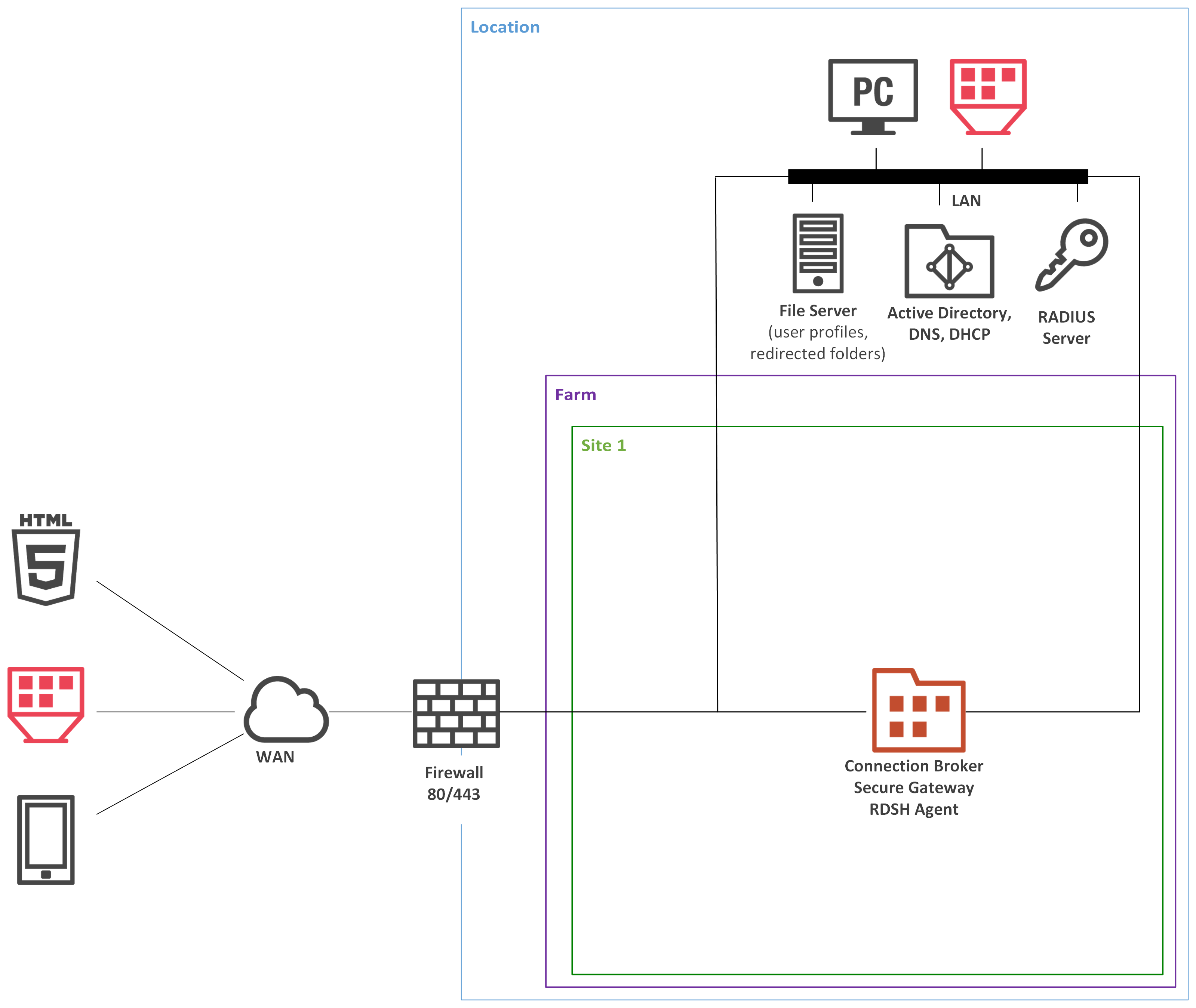
To understand the diagram layout, consider the following sample diagram:

<figure><img src="https://content.gitbook.com/content/jRndoUJVjRrmCN0WR7H6/blobs/ckbwEEc7dOuOZa2ZjCsL/diagramlayout.png" alt=""><figcaption></figcaption></figure>

The left side of the diagram displays client devices that can connect to Parallels RAS. In the example above, the clients are (from top to bottom):

* HTML5 enabled web browser
* A converted Windows PC running in Kiosk mode
* A mobile device (iOS, Android)

The **Location** rectangle denotes a physical location, such as an office.

**Firewall**, represented by a brick wall, is responsible for network protection. Please note that if the scenario description doesn't include any specifics about DMZ or firewall(s), it is up to the administrator or network security officer to decide how network protection should be implemented.

The **Farm** rectangle represents a Parallels RAS farm, which is comprised of one or more sites.

The **Site 1** rectangle represents a site with individual servers and components. In the example above, the site has a single server with RAS Connection Broker (CB), RAS Secure Gateway (SG), and RAS RD Session Host Agent installed.

The **LAN** bar represents a local area network with the following computers and servers connected to it:

* Desktop computer
* Converted Windows PC running in Kiosk mode.
* File server
* Active Directory, DNS, and DHCP server(s)
* RADIUS server

The lines between icons denote the communication channels between individual components.

The **Installation Notes** section describes how a component (or components) must be installed on a corresponding server. The following installation methods are used to install Parallels RAS server components:

* **Parallels RAS Installer (standard installation)**. This is a standard MSI installer package that you run in Windows to install an application.
* **Windows Installer (custom installation)**. This is the same type of installer as described above, but you must choose the **Custom** installation type, which allows you to select which component(s) you want to install.
* **Push Installation**. A component is installed remotely from the RAS console by pushing the MSI installer packages to a remote server and then performing an unattended installation on it.
* **Virtual appliance**. A preconfigured virtual appliance for VMware or XenServer. You can download a virtual appliance for the hypervisor you are using from the Parallels website by visiting the following URL: <http://www.parallels.com/products/ras/download/server/links/>