> For the complete documentation index, see [llms.txt](https://docs.parallels.com/landing/llms.txt). Markdown versions of documentation pages are available by appending `.md` to page URLs; this page is available as [Markdown](https://docs.parallels.com/landing/ras-reference-architecture/v20/capacity-considerations.md).
# Capacity Considerations
Parallels conducted in-house Parallels RAS scalability testing using a total of two HP DL360 consisting of the following hardware components:
| Component | Description |
| --------- | ---------------------------------------------- |
| CPU | 2x Xeon E5-2670 v1, 2.6GHz, 20 MB L3, 115W TDP |
| RAM | 128 GB, 16x 8 GB Micron DDR-4-2100 at 1600MHz |
| HDD | Western Digital Blue 1 TB SSD |
The following Parallels RAS lab environment was used:
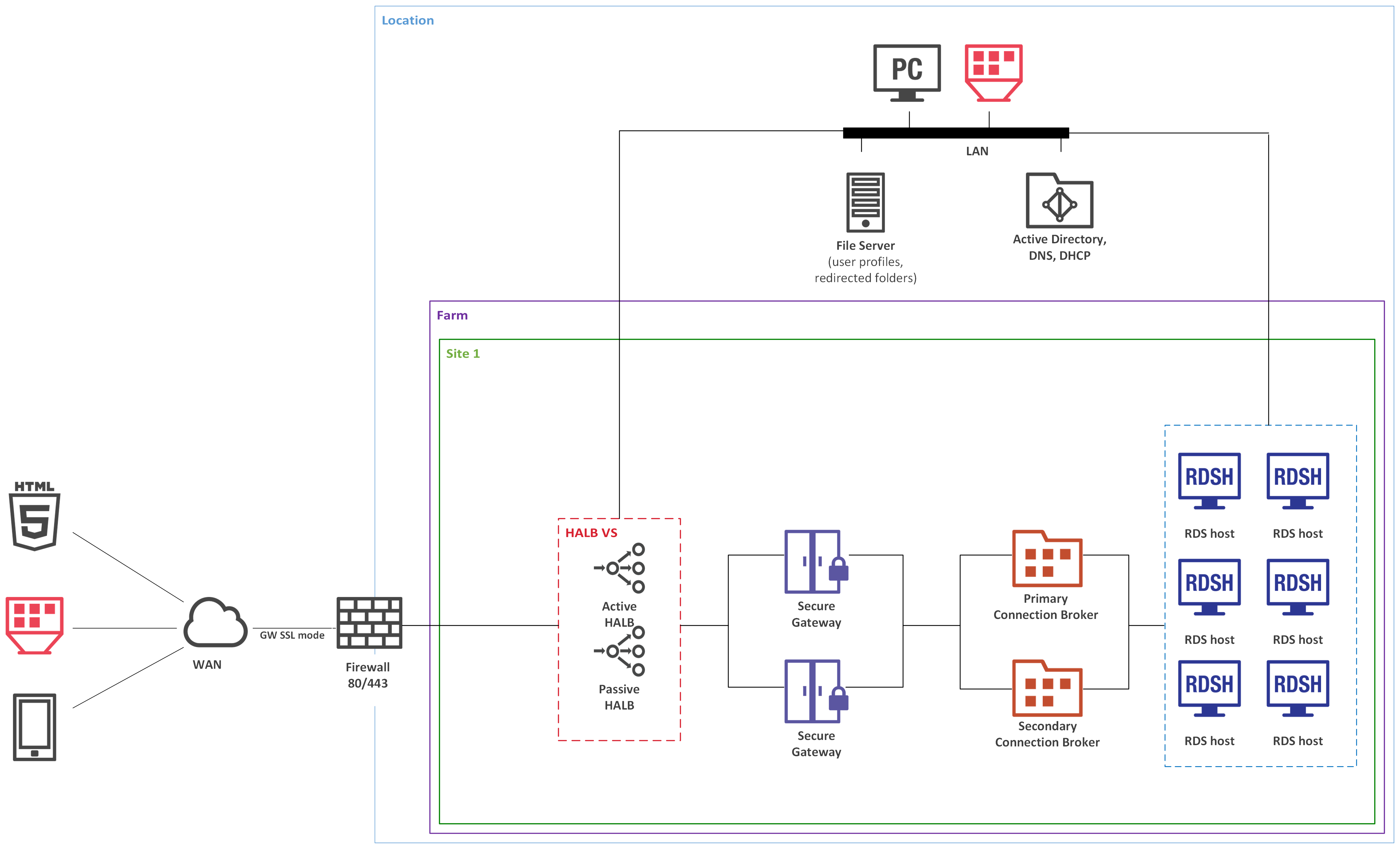
* A farm consists of 1 site.
* Single hop DMZ.
* Each Secure Gateway can host 1200 sessions in Gateway SSL mode (enumeration and proxying RDP session in SSL + User Portal).
* Each Secure Gateway has User Portal enabled and balanced by HALB using the same port 443 (When using URL the incoming connections will be distributed appropriately because SSL session persistence is in a place).
{% hint style="info" %}
**Note:** To enable SSL and User Portal, a server certificate must be installed.
{% endhint %}
## **250 users**
Parallels RAS was deployed on VMware vSphere 6.5 on Windows 2016 Server as follows:
| Parallels RAS Component | Total VMs | vCPU in Each VM | RAM in Each VM |
| -------------------------------- | --------- | --------------- | -------------- |
| RAS Connection Broker | 2 | 2 | 4 GB |
| RAS Secure Gateway | 2 | 2 | 4 GB |
| High Availability Load Balancing | 2 | 1 | 2 GB |
| RD Session Host | 6 | 6 | 24 GB |
* All components doubled for redundancy.
* RDSH N+1 for redundancy.
The above configuration has been tested with both our internal tools and Login VSI. For more details, you could read the **Parallels RAS Scalability Testing with Login VSI** paper, which is available at the following URL:
## **500 users**
Parallels RAS was deployed on VMware vSphere 6.5 on Windows 2016 Server as follows:
| Parallels RAS Component | Total VMs | vCPU in Each VM | RAM in Each VM |
| -------------------------------- | --------- | --------------- | -------------- |
| RAS Connection Broker | 2 | 2 | 4 GB |
| RAS Secure Gateway | 2 | 2 | 4 GB |
| High Availability Load Balancing | 2 | 1 | 2 GB |
| RD Session Host | 12 | 6 | 24 GB |
* All components doubled for redundancy.
* RDSH N+2 for redundancy.
**1000 users**
| Parallels RAS Component | Total VMs | vCPU in Each VM | RAM in Each VM |
| -------------------------------- | --------- | --------------- | -------------- |
| RAS Connection Broker | 2 | 2 | 4 GB |
| RAS Secure Gateway | 2 | 2 | 4 GB |
| High Availability Load Balancing | 2 | 1 | 2 GB |
| RD Session Host | 24 | 6 | 24 GB |
* All components doubled for redundancy.
* RDSH N+4 for redundancy.
---
# Agent Instructions
This documentation is published with GitBook. GitBook is the documentation platform designed so that both humans and AI agents can read, navigate, and reason over technical content effectively. Learn more at gitbook.com.
## Querying This Documentation
If you need additional information that is not directly available in this page, you can query the documentation by asking a question.
Perform an HTTP GET request on the following URL with the `ask` and `goal` query parameters:
```
GET https://docs.parallels.com/landing/ras-reference-architecture/v20/capacity-considerations.md?ask=&goal=
```
`ask` is the immediate question: it should be specific, self-contained, and written in natural language.
`goal` is what the user is ultimately trying to achieve, the reason they need the answer. Sharing it helps GitBook give you a better, more relevant answer. A goal is most helpful when it describes the outcome the user wants rather than restating the question. For example, with `ask=how do I create an API token`, a goal like `automate deployments from our CI pipeline` lets GitBook tailor the answer to that use case.
The response will contain a direct answer to the question and relevant excerpts and sources from the documentation.
Use this mechanism when the answer is not explicitly present in the current page, you need clarification or additional context, or you want to retrieve related documentation sections.