> For the complete documentation index, see [llms.txt](https://docs.parallels.com/landing/llms.txt). Markdown versions of documentation pages are available by appending `.md` to page URLs; this page is available as [Markdown](https://docs.parallels.com/landing/ras-reference-architecture/v20/introduction/parallels-ras-basic-concepts.md).
# Parallels RAS Basic Concepts
When a user connects to Parallels RAS from Parallels Client, they are presented with published resources (applications, desktops, documents, etc). The user selects a resource and launches it. The system load-balances user requests automatically and launches the resource from a least-loaded host. The user is then presented with the resource seamlessly via RDP protocol
The Parallels RAS building blocks are (see the previous section for a detailed explanation):
* Farm
* Site
* Agents
The first server added to a farm creates a new site and becomes the primary RAS Connection Broker in that site. The server also becomes the farm’s Licensing Server handling device connection licenses. Every Connection Broker in the farm (when more than one exists) keeps a synchronized copy of the Parallels RAS configuration database. When the administrator makes any changes to the Parallels RAS configuration in the Parallels RAS console, the changes are replicated to all other Connection Brokers.
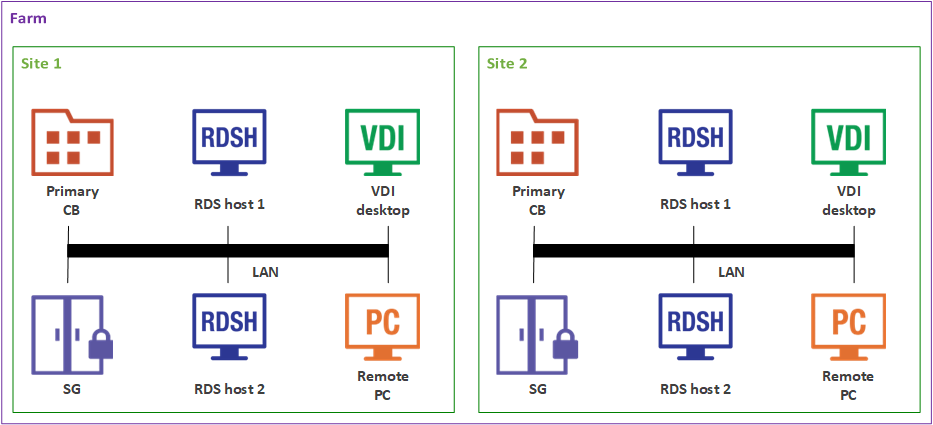
The following diagram illustrates a Parallels RAS installation with two sites (Site 1 and Site 2), each consisting of a primary Connection Broker (Primary CB), RAS Secure Gateway (SG), RD Session Host (RDS host 1), a second RD Session Host (RDS host 2), VDI (Virtual Desktop Infrastructure) server, and a Windows PC.
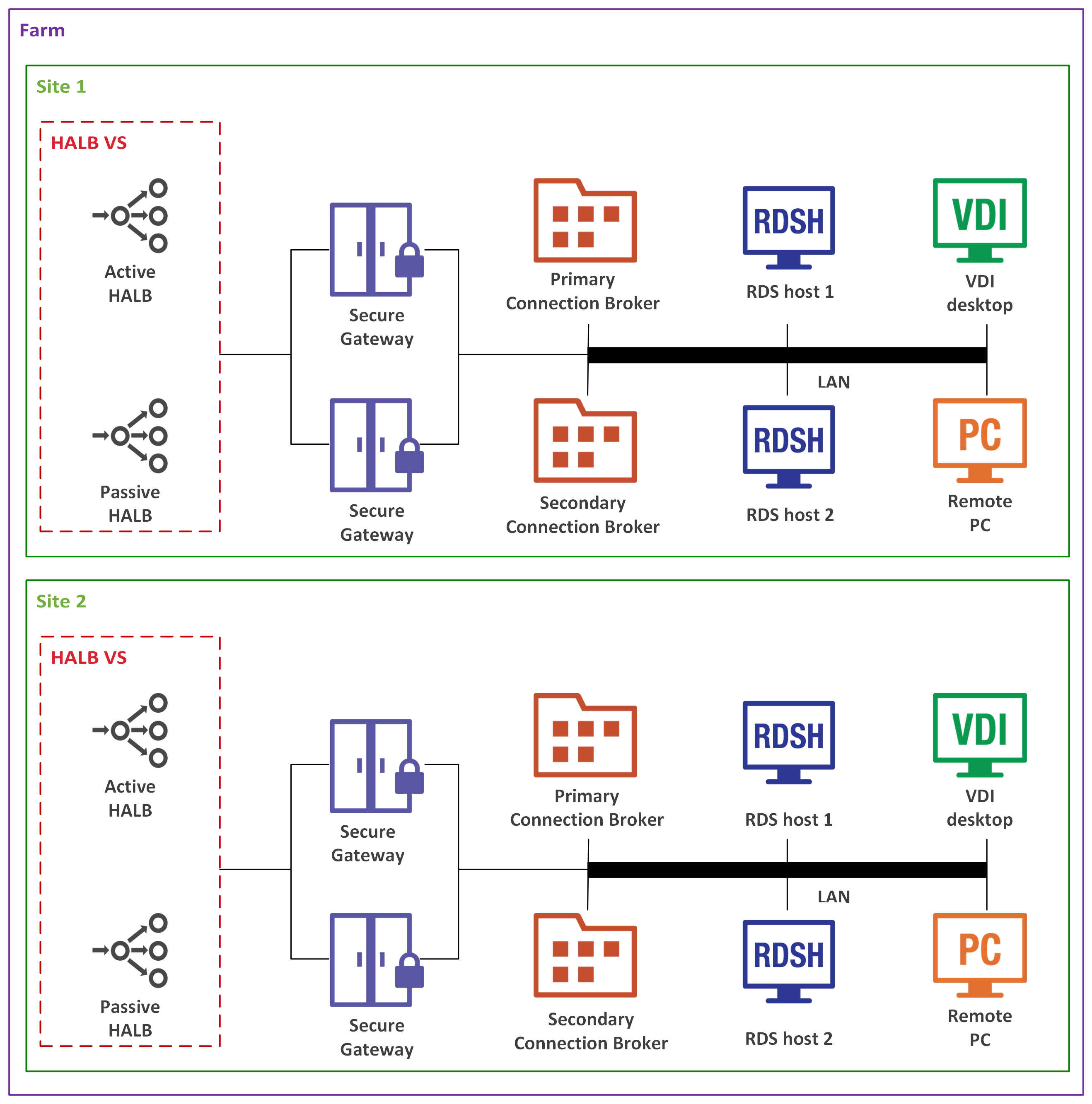
Adding more RAS Connection Brokers and RAS Secure Gateways adds redundancy to the system. HALB Virtual Server (VS) is a virtual representation of the HALB appliances (optional component), which can be added to load balance application traffic.
{% hint style="info" %}
**Note:** Resources (RD Session Host, Remote PCs, VDI hosts) that are members of one site cannot be shared with other sites. For example, the RDS host 1 server is a member of Site 1, which means that it cannot be accessed by users who are connecting through a Secure Gateway and a Connection Broker located in Site 2.
{% endhint %}
---
# Agent Instructions
This documentation is published with GitBook. GitBook is the documentation platform designed so that both humans and AI agents can read, navigate, and reason over technical content effectively. Learn more at gitbook.com.
## Querying This Documentation
If you need additional information that is not directly available in this page, you can query the documentation by asking a question.
Perform an HTTP GET request on the following URL with the `ask` and `goal` query parameters:
```
GET https://docs.parallels.com/landing/ras-reference-architecture/v20/introduction/parallels-ras-basic-concepts.md?ask=&goal=
```
`ask` is the immediate question: it should be specific, self-contained, and written in natural language.
`goal` is what the user is ultimately trying to achieve, the reason they need the answer. Sharing it helps GitBook give you a better, more relevant answer. A goal is most helpful when it describes the outcome the user wants rather than restating the question. For example, with `ask=how do I create an API token`, a goal like `automate deployments from our CI pipeline` lets GitBook tailor the answer to that use case.
The response will contain a direct answer to the question and relevant excerpts and sources from the documentation.
Use this mechanism when the answer is not explicitly present in the current page, you need clarification or additional context, or you want to retrieve related documentation sections.